Showing posts with label cam. Show all posts

Monday, January 26, 2015

New Release : Kipware® SketchPad Machinist CYCLE Mode

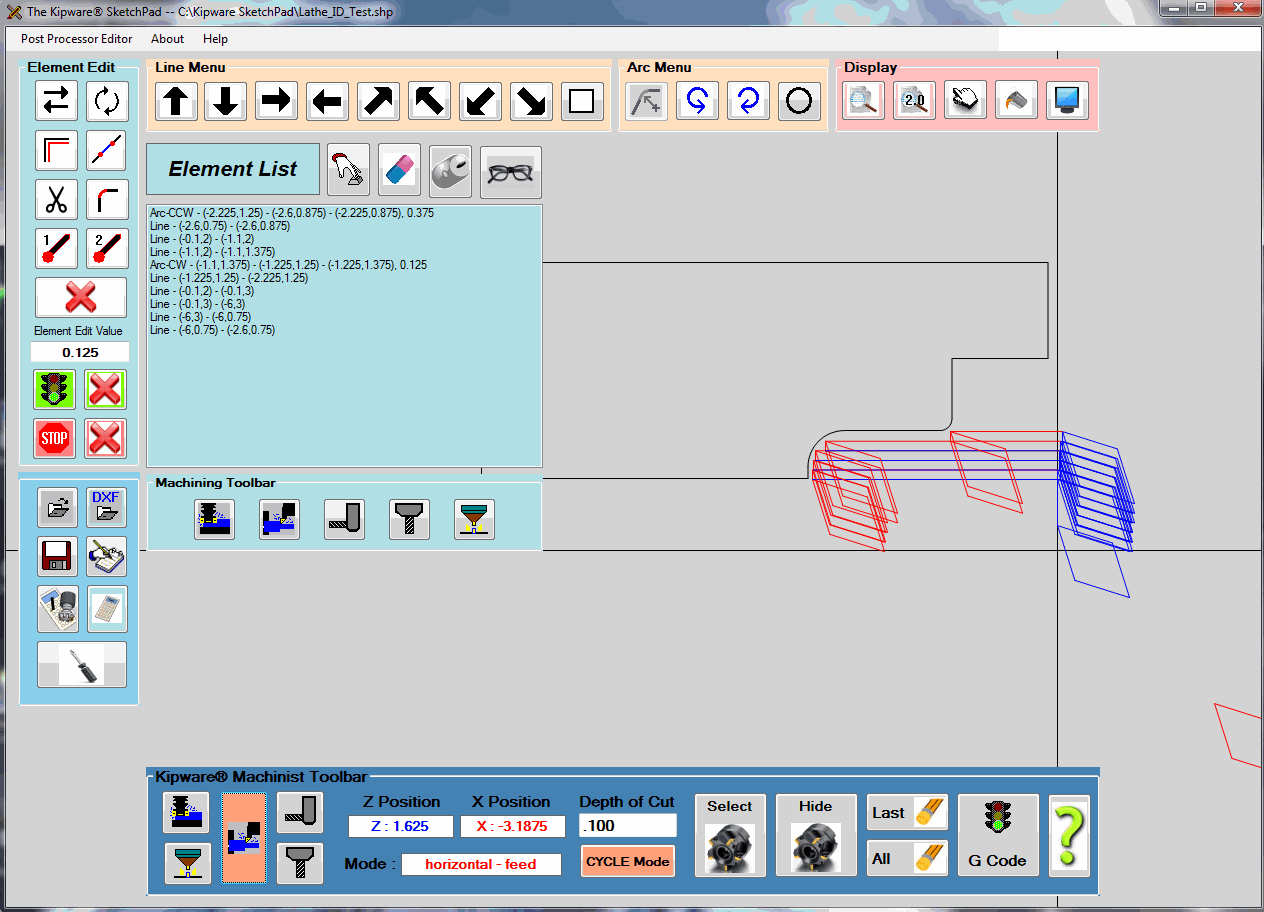
Kentech Inc. is pleased to announce the release of the CYCLE MODE for the Kipware® SketchPad - Conversational CAD/CAM application. The new Kipware® SketchPad ... Version 11.0.0 ... is available STANDARD with ALL Kipware® Conversational CNC Programming titles and also is available as a stand-alone application.


The MACHINIST MODE in the Kipware® SketchPad is our unique toolpath creation function that allows users to create G code programs for ANY shape and pattern by simply moving and double-clicking the mouse ... which is an on-screen simulation of a user defined cutting tool.  Using RAPID, FEED, HORIZONTAL, VERTICAL, FREE HAND and now CYCLE modes ... users can quickly and easily create G code programs that has them in complete control of the cutting toolpath. No complex menus and no complex commands ... just move the mouse and double-click to record.

The new CYCLE mode adds even more control by allowing the user to control the DEPTH OF CUT with simple keystrokes of the keyboard ARROW keys. These keys combined with the RAPID and FEED modes allow for the fast and easy creation of ROUGHING toolpaths for ANY type of contour or shape.

The video below illustrates both the MACHINIST mode and new CYCLE mode in more detail :


For additional information on Kipware® conversational titles 
as well as the Kipware® SketchPad ... 
please visit our website : www.KentechInc.com

Kenney Skonieczny - President
Kentech Inc.


Tuesday, October 7, 2014

Enhanced DXF Import for the Kipware® SketchPad

Kentech Inc. has released the latest version of the Kipware® SketchPad ... Version 10.1.2 ... that contains enhanced DXF import capabilities as well as new algorithms for the auto-connect feature.

Version 10.1.2 enhances the ability of users to import DXF files and then create G code toolpaths to machine those DXF shapes through the SketchPad's Machinist Mode and also through the auto-connect feature in the SketchPad.

In addition to the enhanced DXF import capabilities ... improvements and enhancements have also been released to the auto-connect feature through which the SketchPad connects elements in the sketch to create a connected contour toolpath. Using this feature ... the user selects the first and last element in the contour ... and the SketchPad calculates and auto-connects all elements that make up the connected contour between that first and last element. DXF files ... being somewhat un-precise as far as the decimal precision of the files exported ... can often make the job of connecting elements extremely tough. New algorithms and calculations contained in this new release give the SketchPad enhanced capabilities when finding elements to connect.

Additional information on Kipware® conversational and the Kipware® SketchPad can be found on our website ... www.KentechInc.com.

Kenney Skonieczny - President
Kentech Inc.

Monday, August 18, 2014

New Release : Auto-Trim and Filleting for the Kipware® SketchPad

Kentech Inc. is pleased to announce the release of Version 10 of the Kipware® SketchPad - our Conversational CAD/CAM application that is available either as a stand-alone application and is also included standard with all Kipware® Conversational titles.

Version 10 is released with many new features "under the hood" ... but also a couple not so hidden ones as a response to client requests. If you follow us on Twitter ( @Kipware ) Facebook or through our Blogs ... you know that no machine shop software developer works harder to bring new features and new development to market more than Kentech Inc.. We are constantly publishing blog posts outlining our tons of new releases for all our software titles. As we continue the development of the Kipware® SketchPad into a more powerful drawing package ... we are also balancing the ease-of-use into our development. That thoughtful development has led us to two powerful and sought after features in a drawing package into this Version 10 SketchPad release.


TRIM : The new TRIM feature allows the users to simple select the (2) elements from the Element List box ... and have the SketchPad automatically determine the intersecting point of (2) entities and trim the excess from those entities at their auto-calculated intersecting point.


FILLET : The new FILLET feature works similar to the TRIM feature outlined above ... except will not only trim the entities but will also add a user defined radius between the (2) entities.


You can watch a video presentation of these new features on our 
YouTube Channel : KTSoftware


These new features are shipping standard in the Kipware® SketchPad ... which is included with all Kipware® Conversational titles ... as of August 18, 2014.

Kenney Skonieczny - President
Kentech Inc.


Don't Be Fooled by limited, under-developed, so-called G Code "Wizards" ...
Go Pro with Kipware® Conversational !!

Monday, July 21, 2014

Programming with Kipware® Software - Press Parts to Tesla Parts

As we have stated many times ... we are extremely proud of the fact that thousands of machine shops around the world have found a productive, efficient, steady and reliable solution to their manufacturing needs through our Kipware® software. We love to hear about those real world situations where Kipware® software is making a difference.

Last week we had the privilege of working closely with two of our clients who were in the middle of those "gotta have it tomorrow" projects ... creating CNC programs for two very different machining projects.

Problem #1 - Creating Parts for a Tesla Automobile
Simultaneously while working on the issue below ... we also had a client contact us who was in the midst of a rush programming project .... programming a contour to machine a part that would eventually be used in the Tesla electric car. Although they had been using the conversational module of Kipware® conversational for years to program their "standard" parts ... this particular part required a no-traditional contour be programmed ... and required the use of the Kipware® SketchPad. Not having too much experience and in a rush to get their parts made ... we stepped in and up.

The Solution :
The client emailed a DXF file of the contour ... and using our Kipware® SketchPad we created the G code program to machine the parts. It was great to have the opportunity to utilize the software we created to create a real world G code program to machine a real world part. And the coolest part was that it was for Tesla car ... although Elon Musk's SpaceX is already a member of the Kipware® family with (40) seats of Kipware® in their Hawthorne California manufacturing facility.

Problem #2 - Small Part Programming
As mentioned ... while working on the project above ... we were also called into action to support another small manufacturer client who was working to create a one-off specialty item for their customers. They were creating their program using Kipware® conversational ... and found the machine doing some strange movements when executing the G code program. Unable to diagnose the issue ... it was something they never experienced before ... they submitted a Support Ticket through our Helpdesk and asked for our assistance. The problem was new to us as well ... and required we talk directly by phone to get more information and lend some deeper assistance. It turned out that the client was new to CNC programming ... had been using Kipware® conversational for quite a while and getting all their programming done with Kipware® quite nicely ... but were now experiencing a little more complex part and programming that was getting a bit more complex ... mainly dealing with cutter compensation. Long story short ... their machine had some specific requirements and the program being created by Kipware® using standard cutter comp programming was causing the generation of some errors by the control.

The Solution :
We worked with the client suggesting some alternative G code programming solutions ... explaining how to create the revised G code and why ... to try a few different scenarios to diagnose the issue. Once the issue was diagnosed and an alternative G code model created that worked ... in less than (2) hours we had revised Kipware® to include a new, user selectable alternative option for cutter compenstion output ... and had an UPGRADE installation ready and available for the user to download. It was great working hand-in-hand with the client ... both teaching and helping them program ... and creating some newer features for our Kipware® conversational based on their real world inputs.

As you can see from the scenarios above ... Kentech Inc. is more than committed to our software support ... we are committed to our clients. This is just a small sample, a couple of scenarios from one week in our business life. These types of scenarios are repeated quite often here ... and we're always happy to jump in and assist in any way possible. And it's especially rewarding as we get to go into the "real world" ... on the shop floor ... and help make some chips !!

Kenney Skonieczny - President
Kentech Inc.


Thursday, April 17, 2014

It's Not Always Rocket Science

If you have visited our website ...  www.KentechInc.com ... at all you'll recognize the saying that is the title of this blog post. It is the mantra here at Kentech Inc. ... born from the decades of living and surviving on the machine shop floor ... from living and working in the "real world". When we talk with customers or conduct online demos with clients for our software ... they emphatically agree. But for those with whom we cannot connect directly ... we wanted to take a post to outline our visions and software design philosophy in depth ... to explain why we feel and what we mean by " ... it's not always rocket science."


Is this you with your CAD/CAM or MRP / ERP software?
For most machine shop and CAD/CAM software developers today ... it seems that the flashier the pictures and the more complex the user interface ... that would equate into the most innovative software. For most users of these products however ... the experience is best described as trying to get a drink of water from a firehouse. It's all just overkill .... there is just too much "fluff" there ... most of it is lost or never used ... and the bottom line results are never realized.

Take CAD/CAM for example ...
No one can deny that CAD/CAM is a great tool ... no doubt ... and most of the designs we use in the world every day would not be possible without at least the CAD portion of CAD/CAM. But one fact is clear to anyone living in a production world ... if a machine shop puts every job through the CAD/CAM system ... through the CAD/CAM programmer ... they are inevitably losing money. The simple part programming ... the programming actually done in 95% of shops in the real world every day ... does not require a CAD/CAM system ... nor a CAD/CAM programmer. Giving additional chip makers the capability to quickly and easily create G code programs for these simpler workpieces ... gives the shop a much higher level of efficiency ... faster finished part output ... and in the end a better bottom line. It's a simple fact. Of course not every workpiece can be accomplished with a simple programming tool ... those complex jobs will still require something equivalent to a CAD / CAM system ... but with other chip makers handling the simpler programming ... the "CAD/CAM guy" has more freedom and more time to devote to the complex programming tasks ... and the work flow and finished output is greatly enhanced.

Innovation is not always the most complex solution.
OR take MRP/ERP systems for example ...
Again ... no one can deny that these complex systems have their place ... and can positively effect a companies bottom line. The problems we encounter is that there a way too many "features" ... and as a result they are either missing the important "real world" features ... or these features are so under-developed the results they produce do more harm than good. It seems the developers are so concerned with the number of bells and whistles ... they never adequately develop the truly needed features. For example ... quite a few of the big $$$ MRP and ERP systems denigrate machining cycletime to a simple user input ... no auto-calculations ... just a field for a user input. WHAT ??  Anyone living in the real world knows that building a cost estimate based on an inaccurate time to machine the part is a recipe for lost profits. And anyone living on the shop floor knows that consistency and accuracy along with the ability to insure that cutting parameters used in cycletime estimates can be reproduced on THEIR shop floor .... is the key to machining profitability.


KipwareCYC® ( cycletime estimating ) and KipwareQTE® ( cost estimating ) are applications devoted to the tasks for which they were developed. Proven in-the-trenches for over 2 decades ... helping our clients around the world to not only win MORE work ... but win MORE PROFITABLE work. And after all isn't that the key ... winning work that is profitable ... not having the shop busy producing parts that are losing money.

Kipware® =  a more logical approach
Using real world tools like Kipware® conversational or Kipware® business software is the equivalent of turning down the flow of the firehouse ... more of that water can be captured and used for it's intended purposes.

CLICK HERE for more information on Kipware® software


Kenney Skonieczny - President
Kentech Inc.

Tuesday, April 1, 2014

New Release - 4th Axis Taper Slotting Menu

We continue to build on our strong foundation of 4th Axis Conversational Menus in our KipwareM® - Conversational CNC Programming Software for Milling. The latest conversational menu release comes by way of a current user who was seeking an easier way to program taper slots for lightening rifle barrels. We had previously developed and released STRAIGHT and TWISTED SLOTTING menus ... and this new release allows for straight slots that are tapered in the Z axis while cutting along the X axis.


This new menu contains many options allowing for greater flexibility including :
  1. Single or Double Tapers are available.
  2. Zig-Zag or One-Direction cutting can easily be selected.
  3. The user can include any number of slots along the OD periphery ... all from a single menu.
  4. Roughing and / or Finishing can be included in a single operation ... or split into two operations.
As with all the 4th Axis Conversational Menus ... this new menu is also included FREE with all KipwareM® purchases.


Kenney Skonieczny - President
Kentech Inc.

Don't Be FOOLED by the underdeveloped so-called G CODE WIZARDS ...
GO PRO ... with Kipware® Conversational

Thursday, March 20, 2014

New Release - Y Axis Programming Now Available in the Kipware® SketchPad

On the heels of our ground-breaking conversational Y axis programming release for KipwareT® ... CLICK HERE for info on that release ... we have now also released Y axis programming capabilities in the Kipware® SketchPad. Using either the SketchPad Machinist Mode or the normal finishing mode ... users can create G code programs for Y axis milling on either the FACE or the O.D. of a workpiece.

Some feature outline :

  1. Using simple - standard X/Y drawing ... the user can either draw directly in the SketchPad or import a DXF file into the SketchPad.
  2. After the toolpath is created or selected ... the SketchPad automatically takes care of all transposing of coordinates to create either an X/Y toolpath on the FACE using X diameter or X radius values ... or a Y/Z toolpath on the OD using either X diameter or X radius values.
  3. All Live Tool machine functions such as M codes are completely user configurable within the SketchPad to insure complete compatibility with YOUR equipment.


We invite you to view the video link above for additional illustrations and information.

You can also visit our YouTube Channel ... KTSoftware ... to view our wide selection of presentation and training videos for ALL our Kipware® titles.

Kenney Skonieczny - President
Kentech Inc.

DUMP the limited, under-developed so called "wizards" ...
GO PRO with Kipware® Conversational !!

Friday, March 7, 2014

New Release - Y Axis Conversational for KipwareT® Conversational Turning

Following on the heels of our ground-breaking conversational 3D milling for our KipwareM® software ... Kentech Inc. is pleased to announce the release of our conversational Y Axis Milling option for KipwareT® - Conversational CNC Programming Software for Turning.


This Y Axis option for KipwareT® contains the following machining options :
  1. Square / Rectangular Pocketing on the OD or the FACE ... with the ability to ROTATE the shape any user-defined degree.
  2. Round Pocketing on the OD or the FACE
  3. Slotting on the FACE
  4. Square / Rectangular Boss machining on the OD or the FACE ... with the ability to ROTATE the shape any user-defined degree.
  5. Round Boss machining on the OD or the FACE
  6. O-Ring Groove machining on the OD
  7. Hex Milling on the FACE
  8. ID Thread Milling on the OD or the FACE
  9. Drilling on the OD or the FACE with variious patterns including Bolt Circle, Holes-On-A-Line, Grid Pattern or unlimited, individual user-defined locations.
As with all Kipware® conversational applications ... powerful and complete G code programs are created for all the above machining possibilities using plain English, fill-in-the-blank forms such as the ones illustrated below.


Powerful programming options such as CW or CCW ROUGHING - CW or CCW FINISHING - CUTTER COMP and more are all easily applied by the user by simple inputs or by checking the appropriate option box. In addition ... all menus incorporate our newly released KipwareCSF® - Cutting Speed and Feed Wizard for Kipware® Conversational on all menus.

Additional information and videos will be available the week of 3/10/2014 with additional information also being posted during that time to our website ... www.KentechInc.com.

The new Y Axis Programming Option for KipwareT® - Conversational CNC Programming Software for Turning will be available for purchase on Wednesday ... 3/12/2014. Pre-Delivery orders are being accepted NOW ... contact Kentech Inc. at 1.888.754.1198 during normal business orders ( 9:00 am - 4:00 pm. Monday - Friday ) and SAVE 10% off the $200 option price for the Y Axis Milling option for KipwareT®.

Kenney Skonieczny - President
Kentech Inc.


Dump the limited and underdeveloped 
G code "wizards" ...
GO PRO with Kipware® conversational !!

Tuesday, February 18, 2014

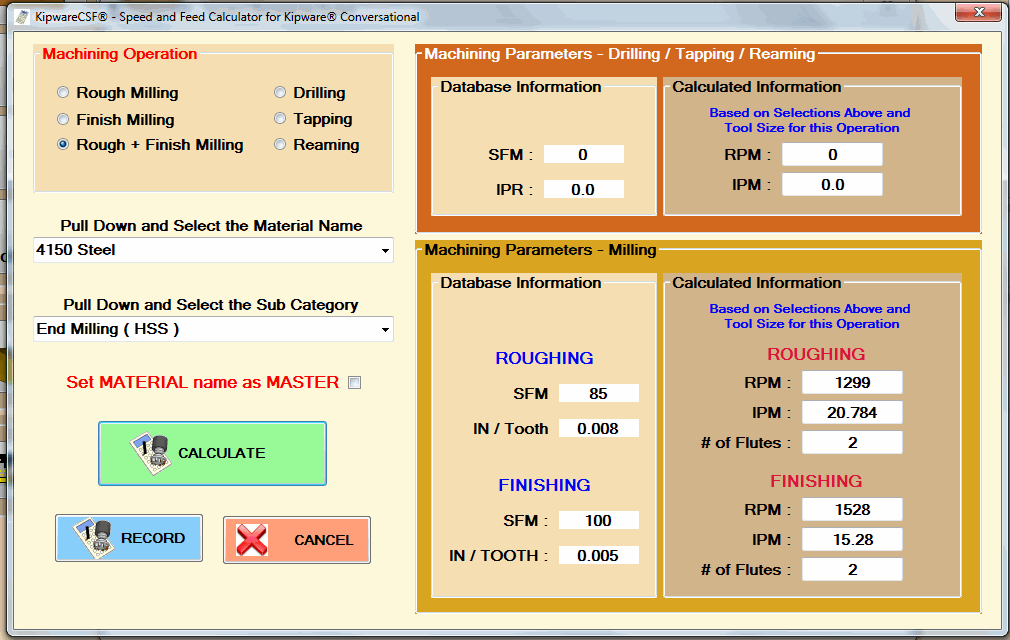
New Release : KipwareCSF® Speed and Feed Wizard for KipwareT® and SketchPad

Kentech Inc. is pleased to announce the release and integration of our new KipwareCSF® - Machining Speed and Feed Wizard for Kipware® Conversational into both KipwareT® and the Kipware® SketchPad.


Access to the KipwareCSF® Speed and Feed Wizard is now available on 
ALL KipwareT® conversational menus.


Access to the KipwareCSF® Speed and Feed Wizard is now available on 
ALL Kipware® SketchPad machining menus.

For additional KipwareCSF® release information and to view an in-depth presentation video ... please visit the link below :

Kenney Skonieczny - President
Kentech Inc.


DUMP the underdeveloped so-called G Code "WIZARDS" ...
GO PRO with Kipware® Conversational !!

Friday, February 7, 2014

New Release - KipwareCSF® Machining Speed and Feed Wizard for Kipware® Conversational

Kentech Inc. is pleased to announce the release of our latest feature for Kipware® conversational CNC programming software ... KipwareCSF®.

KipwareCSF® is our machining speed and feed wizard for Kipware® conversational and will automatically calculate cutting parameters for conversational cycles based on a user defined cutting parameter database. This new STANDARD feature adds a tighter integration and auto-calculations for spindle speeds and cutting feedrates to Kipware® conversational.


The KipwareCSF® database is uniquely designed to be both easy to integrate and powerful with an unlimited capacity ... allowing the user complete control and greater flexibility than "book knowledge" speed and feed wizards.

KipwareCSF® calculations can be accessed inside ANY conversational menu in Kipware® conversational ... making auto-calculations of cutting parameters and auto-insertion of those parameters smooth, quick and easy.

We invite you to explore KipwareCSF® and all the latest features through our new introductory video ... just click the link below.
Please Click the ICON or CLICK HERE to view the KipwareCSF® Video

Kenney Skonieczny - President
Kentech Inc.

Thursday, January 23, 2014

New KipwareT® Feature Added - Conversational Knurling Menu

In response to a request from an existing KipwareT® - Conversational CNC Programming Software for Turning client ... we have released a new conversational menu ... O.D. Knurling.

Our client has encountered the need to program an O.D. Knurling operation more and more frequently as they have added a new part to their product line ... and since they use KipwareT® almost exclusively for the CNC programming of their Fanuc based Miyano CNC lathe ... they enquired to us if we could develop and add a conversational knurling menu to KipwareT®.

Always eager to add new features based on client "real world" input ... we developed a conversational knurling menu and are now including it STANDARD in all KipwareT® packages from 1-22-2014 on.


This new KipwareT® menu allows for quick and easy knurling operation programming and includes features for real world programming such :
  • selection of the desired knurling / cutting direction.
  • selection of the infeed / plunge feedrate
  • selection of the traverse feedrate
As stated earlier ... this new KNURLING menu is now included standard in KipwareT® as of 1-22-2014.

Kenney Skonieczny - President
Kentech Inc.


Dump the limited and underdeveloped 
G code "wizards" ...
GO PRO with Kipware® conversational !!

Friday, November 22, 2013

Curved Surface Added to KipwareM® 3D Menu

As we continue our torrid development pace heading toward the year end ... we have released another new KipwareM® 3D conversational option developed from a KipwareM® user request.

Our user needed to machine a specific part for the Harley Davidson company and wanted a simpler way to create the G code program then having to trudge through his CAD/CAM system. Having dealt with Kentech Inc. on a prior project for some 3D machining ... he approached us again to see if we could develop a solution. We decided it was a perfect application to add to our KipwareM® 3D menu ... and we developed our CURVED SURFACE conversational option for KipwareM®'s 3D menu. Developed at NO CHARGE to our client might I add !!


As you can see from the screenshot above of the CURVED SURFACE conversational menu ... like all our Kipware® conversational menus ... it puts tons of options into the hands of the user. The user can define individual parameters for BOTH roughing and finishing machining such as depth of cut ... feedrates ... etc.. The surface can also be kicked off at any user defined angle ... like all KipwareM® options ... with a single Rotation Angle input !!


Above is a 3D plot of the sample result. This program for both roughing ( with a square end mill ) and finishing ( with a ball end mill ) was created in less than 1.5 minutes ... with NO drawing required !!

This new CURVED SURFACE menu is now shipping standard with the KipwareM® 3D option. For all the other 3D menu options available ... please see our Blog back-post : http://kentechinc.blogspot.com/2013/09/kipware-3d-conversational-programming.html

Thank you to all our customers for their input and support that enables us to continually update and enhance our REAL WORLD machine shop software .

Isn't it time to Dump the limited G Code Wizards and GO PRO ?
Kipware® Conversational are PROFESSIONAL programming
applications ... with built-in PROFESSIONAL features ...
that will help anyone machine like a PRO !!
Kenney Skonieczny - President
Kentech Inc.

Thursday, September 26, 2013

New Release - CLC SketchPad for KipwareCYC® - Cycletime Estimating Software

We are pleased to announce another NEW release for Kipware® ... this one is for our KipwareCYC® - Machining CycleTime Estimating Software.

One of the inputs required when estimating machining cycletime ... is what is referred to as "length of cut". The distance the tool will travel while in the cut. Onviously, this is required along with the cutting feedrate to determine the time it takes the tool to remove the material.

KipwareCYC® has always included an application we call the Cut Length Calculator or CLC. CLC uses a variety of conversational, fill-in-the-blank forms for standard type operations ... pocket milling, drilling, turning, grooving, threading, etc. ... which allow the user to determine length of cut by simply describing the operation. Simple inputs like depth of cut, length and width, diameters, tool diameters, etc. are entered and CLC will auto-calculate the length of cut.


This has always worked well for standard type operations ... but non-standard type operations ... contouring, part profiling, etc. ... still contained a bit of guesstimating to determine the length of cut. It's a fine line between getting the information you require ... and overkill. But we think that we have created a great solution that is accurate ... fast ... and easy-to-use. The CLC SketchPad.


We have taken our proven-in-the-trenches SketchPad from our Kipware® conversational software ... with the patent-pending Machinist Mode ... and adapted it for use in determining length of cut. Basically ... users can import a DXF file ... select a graphical tool representation from the user defined Tool Library ... and then simply move the tool ( mouse ) around the part creating a toolpath they envision would be used for that machining operation. CLC SketchPad will record all the positions automatically and will then auto-calculate the length of cut. Results will be displayed ... and can then be copied to the clipboard and pasted into the KipwareCYC® form in the appropriate field.

You can view a complete presentation video on our YouTube Channel ( KTSoftware ) ... by clicking the link below.


If you are not a KipwareCYC® user ... does your estimating software provide you with a field for length of cut ... or with innovative and accurate tools to assist in it's calculation?

If you are a current KipwareCYC® user ... UPGRADING to the NEW CLC with the CLC SketchPad will add new accuracy and improve your cycletime estimating. Upgrade pricing can be found here ... in the Kentech Inc. OnLine Store.

Kenney Skonieczny - President
Kentech Inc.


Monday, September 23, 2013

Two More NEW Conversational Features Released

"Winter is coming John Snow." ( for all the Game of Thrones fans )

Winter always seems to bring a flurry of development here at Kentech Inc. ... and we have started early. On the heels of our groundbreaking 3D Conversational release for KipwareM® ... we have released two more additional features.

Kipware® SketchPad :
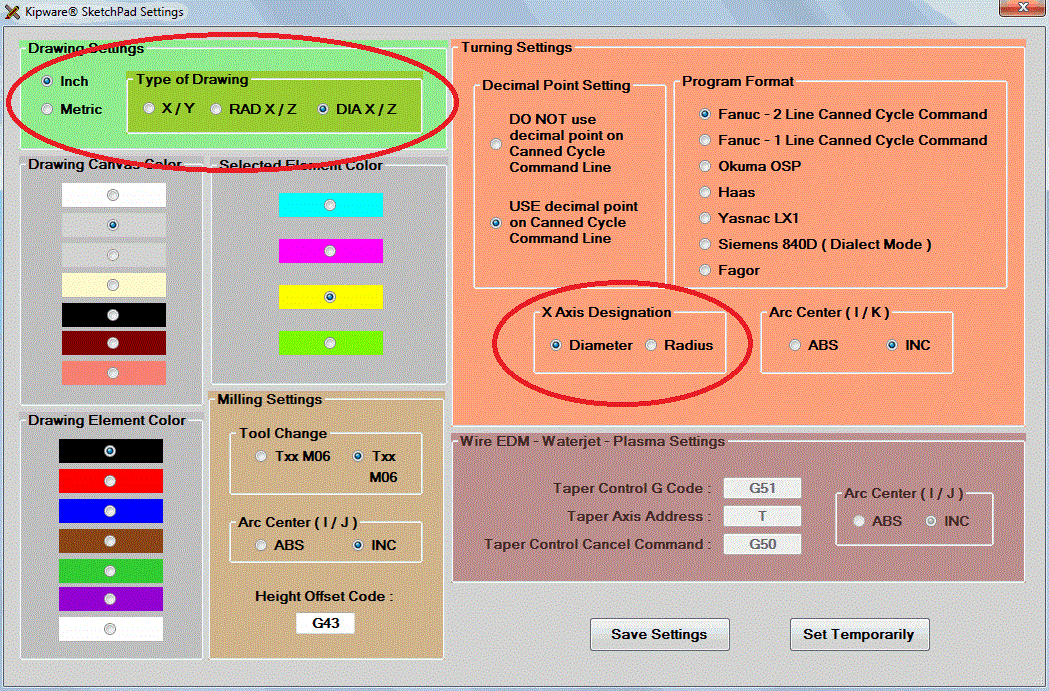
The SketchPad has always required drawing using X and Y coordinates ... even if you were drawing a part to be coded for a lathe. Of course the SketchPad would auto-convert everything and your G code would be either diameter or radius X lathe compatible ... but the actual drawing was done using X and Y coordinates.

The new feature released allows for separate designations for the G code output and now ... a designation for the type of coordinates to be used when drawing. Users can draw using either X-Y coordinates ... radius X - Z coordinates ... or diameter X - Z coordinates. This of course makes drawing a ton easier for "lathe people" ... while still giving you the opportunity to do something funky like ... draw with diameter X and have your G code come out in radius X !!! Pretty neat and very handy ... professional machinists will know what I mean.


KipwareM® 3D Rotation :
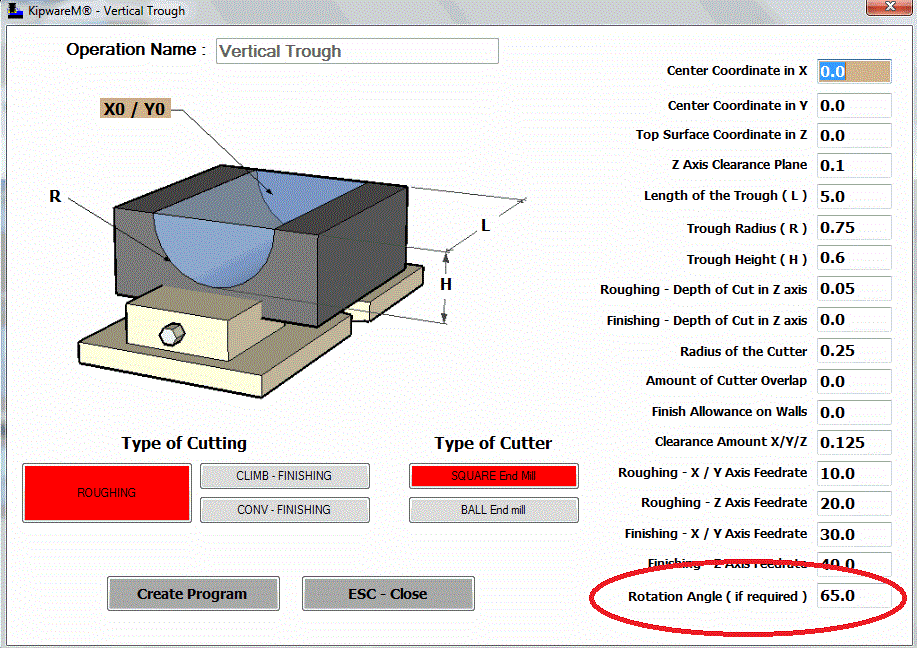
As with all the other menus in KipwareM® ... now the newly released 3D shapes can be ROTATED at any angle with just a simple user input. We have added a ROTATION field on the forms where the user can designate the rotation angle if so desired. Like all the 2D menus ... now the 3D shape can be auto-rotated with just a simple input.

So go ahead ... take that trough and machine it at 65 degrees !!


What's Coming Next :
We now turn our development attention to a feature that has been on my wish list. And since I'm the boss ... I get what I want !!

We have now begun the development of more Live Tool options for KipwareT® to better accommodate the wave of multi-axis turning centers. The next release will have FULL Y AXIS MILLING - ALL CONVERSATIONAL !! Stay tuned ... release will probably be around November.


We keep telling ya ....
Now more than ever ...
DUMP the G CODE WIZARDS !!!
GO PRO with Kipware® Conversational !!
( you don't get development like this from a "wizard " )
( it comes from professionals !! )


Kenney Skonieczny - President
Kentech Inc.
Wednesday, July 17, 2013

Easiest CAM Ever - The Machinist Mode in the Kipware® SketchPad

If you are looking for the easiest, fastest, no-experience-required CAM application on the market ... the Kipware® SketchPad is for you.

Check it out in our latest 2 minute presentation video :


Don't be fooled by the underdeveloped and severely limited "wizards" ... 
GO PRO with Kipware® !!

Kenney Skonieczny - President
Kentech Inc.

Friday, May 31, 2013

Coming in June ...

We are pleased to announce that we will be releasing our newly revised and enhanced KipwarePA® - G Code Programming Assistant application in the middle of June.

Here are a couple of teaser screen shots :

KipwarePA®'s MILLING Mode

KipwarePA's TURNING Mode

Create G code with a simple POINT-AND-CLICK interface.

You can easily customize BUTTONS to output your specific required outputs !!

KipwarePA® was designed to give users an easy programming application in which they can create G code programs. Who can benefit from KipwarePA® ? Basically ... anyone who CREATES ... EDITS ... or works with G code ...here is why :

  • By eliminating typing errors, misplaced codes, missed codes and mis-formatted codes it assists the user to create a error free and efficient programs.
  • KipwarePA® uses a simple point and click interface. By clicking the buttons on the screen the user can add movement...G code...M code...just about anything to the program being created.
  • If more than the click is needed, KipwarePA® will auto-display a fill-in-the-blank form and will auto-convert the entered form data into the correctly formatted corresponding G code output and add to the program editor.
  • As code is being created it is displayed on the screen ... this is a great way to learn G code programming !!
  • Once the program creation is completed ... the code in the window is auto-converted and displayed in our full featured. G code Editor. The Editor is fully G code specific with tons of features like auto-sequencing and re-sequencing, add / remove spaces for readability, and much more. In addition, the Editor can be used from scratch to create or edit ANY G code program ... whether created in KipwarePA® or not.
  • Our KipwareTP® Toolpath Plotting software is also included ... plot programs created in KipwarePA® or ANY G code program.

So .... the complete lowdown :

  • KipwarePA® also is included standard with all Kipware® conversational, full version purchases ... the best of both worlds !!
  • KipwarePA® is also available as a stand-alone application and includes :
  • KipwareTP® - Toolpath Plotter and Editor
  • KipwareDNC® - Serial Communication Software

As always ... UPGRADES for Kipware® conversational software are FREE and INCLUDED for (3) months ... so making a purchase of ANY Kipware® conversational application now will insure you get a FREE UPGRADE to the new KipwarePA® when released in June !!!

So don't wait ... DUMP the WIZARDS !!! ... GO PRO with Kipware® Conversational !!

Kenney Skonieczny
President - Kentech Inc.

Thursday, May 23, 2013

Mid Year Development and Upgrade Report - Kipware® Conversational

At this almost mid-point of 2013 ... we thought it time to update everyone on all the new features now being shipped standard in our Kipware® conversational software ... as well as all our conversational companion applications.

So here we go .... or watch the UPGRADE VIDEO HERE.

KipwareM® - Conversational CNC Programming Software for Milling

  • We recently added (3) new menus : 
  • Qualify Stock ... conversationally create G code to machine the ends of a workpiece
  • O Ring Groove ... conversationally create G code to machine a user defined O Ring Groove
  • Custom EIA Cycle ... create blocks of user defined G code ... great for 4th axis work.
  • Round & Helical Pocketing Enhancements ... users can now easily create pocketing and helical cutting G code for multiple locations ... describe the cutting once ... then either input user defined X/Y locations or use the BC, Grid, Holes-On-An-Angle menus and have KipwareM® auto-calculate the locations. 


KipwareT® - Conversational CNC Programming Software for Turning

  • Custom EIA Cycle ... create blocks of user defined G code ... great for 4th axis work.

Kipware® SketchPad - Conversational CAD/CAM

  • By far the BIGGEST and MOST TALKED ABOUT upgrade ... We recently added our patent-pending Machinist Mode ... just move the tool with the mouse to create your roughing G code for milling, turning, wire EDM, waterjet and plasma.
  • For an in-depth explanation please refer to this recent "... In The Trenches" post : http://kentechinc.blogspot.com/2013/04/easiest-cam-ever-you-decide.html

KipwareTP® - G Code Editor and Toolpath Plotting Software

  • Users now have the ability to create graphical tool representations that can be included in the G code plot.
  • Users can also create Plotting Tool Lists that link the graphic tools with "trigger" codes. For example : T0101 might call a 55 deg diamond graphic ... T0202 might call a .125 OD grooving tool ... etc.. When the G code is being plotted ... trigger codes will cause the tool graphic to change as indicated in the Plotting Tool List.
  • Added an On-Screen Measurement feature ... use the mouse to "measure" points along the plotted toolpath.


You can watch our UPGRADE VIDEO using the link below for a more in-depth look at each new feature and to see all the new features in action.


Many thanks to ALL our fabulous Kipware® users for making Kipware® conversational the NEW STANDARD in conversational CNC software !!

Kenney Skonieczny - President
Kentech Inc.


Don't SETTLE for a limited, underdeveloped "wizard" ... 
GO PRO with Kipware® Conversational !!


Wednesday, May 15, 2013

Kipware® Conversational vs. G Code Wizards

Since the late 90's ... we have worked hard to take our conversational CNC programming software out of the world of "wizards", after-thoughts and add-ons ... and into the world of professional, power packed CAM applications.

We would like to thank the over 1200+ users of Kipware® conversational for proving that our efforts have been successful.

Why? What makes us the professional conversational application that we are?
Here are just a few reasons :

KipwareM® - MILLING :

Here is a sample screenshot of a KipwareM® operation ... in this case a SQUARE / RECTANGULAR POCKET. Just take a look at the machining options available for the user to select :

  1. SQUARE or RECTANGULAR ... long side in X or long side in Y ... the software automatically "sees" it.
  2. CORNER RADIUS ... milled using circular interpolation or plunge ...  the software automatically "sees" it.
  3. X / Y RAMP AMOUNT ... you decide how much ... not an arbitrary angle, a real distance.
  4. FINISH ALLOWANCE ... for walls and bottom.
  5. ROTATION ... pocket at a 5 degree angle ... just input 5 ... the software writes the rotated G code automatically ... and not some G code for rotation ... hard numbers.
  6. ROUGHING and / or FINISHING ... CW or CCW ... climb or conventional ... you decide.
  7. CUTTER COMP ... automatically inserted if you desire ... with auto ramp in / ramp out.
  8. FINISH BOTTOM ... or just the walls ... you decide.
KipwareT® - TURNING :

Here is a sample screenshot of a KipwareT® operation ... in this case an OD GROOVE. Just take a look at the machining options available for the user to select :

  1. DEPTH OF CUT IN Z ... plunge rough ... you determine the Z axis DOC.
  2. CORNER CHAMFER / RADIUS ... just input the value ... and not just 45 degree chamfers ... any angle you want.
  3. CUT-OFF CYCLE ... not just grooving ... cut-off with pecking and even complete retraction.
  4. GROOVING ... tons of options for straight cutting, pecking with just a retract or complete retraction.
These are just a couple of the conversational, fill-in-the-blank menus which our users can use to create complex cutting operations.


Not to mention all the companion apps that come with Kipware® conversational :

  1. Kipware® SketchPad - Conversational CAD/CAM ... easiest CAM ever !!
  2. KipwareTP® - toolpath plotting app now with a full user defined tool library for graphic simulation.
  3. KipwareTB® - machine shop toolbox software
  4. KipwarePA® - point and shoot G code creator for milling and turning.

There are NO OTHER programming app ... "wizard" or hide behind the "conversational wizard" ... that can match the power and features of Kipware® conversational. We invite you to look around ... we are sure that like the 1200+ Kipware® users ... you'll realize that only Kipware® conversational gives you the professional features you need to be successful.


Kenney Skonieczny - President
Kentech Inc.

Friday, April 26, 2013

Easiest CAM Ever? ... You Decide.

The Kipware® SketchPad with the new patent-pending Machinist Mode might just be the easiest CAM program ever.

The Machinist Mode allows the user .. the machinist ... the freedom to take control of the cutter and to create any toolpath desired. The SketchPad frees you from the rigid CAD/CAM world and all the restrictions and inefficiencies that come along with it.

Take a look at our demo video illustrating a pocketing with island example ... then you decide.


The Kipware® SketchPad with the new Machinist Mode is available STANDARD in all Kipware® conversational titles ... or as a stand alone package which includes features for programming milling, turning, wire EDM, waterjet and plasma CNC machines.

Check it our in more detail here :
http://www.kentechinc.com/KipwareSketchPad.shtml

Kenney Skonieczny - President
Kentech Inc.