Showing posts with label G code. Show all posts

Tuesday, February 24, 2015

Kipware® VS. CAD/CAM ... "wizards" ... and conversational CNC controls

Some of the most frequently asked questions we hear in regards to conversational CNC programming are :
  1. "Why should I consider Kipware® conversational over CAD/CAM ?"
  2. "Why should I consider Kipware® over a conversational CNC control ?"
  3. "What's the difference between Kipware® and those G code "wizards"?
And we actually love these questions ... because the answer becomes really clear with some simple explanations and some outlining of the facts. If you're wondering the same ... here's a brief outline.

Kipware® VS. CAD/CAM


STOP the CAD/CAM Frustration !!
  • 95% of everyday CNC programming does not require a CAD/CAM system ... despite what the CAD/CAM companies tell you. If you are a job shop performing every day type programming ... excluding complex aircraft components like airfoils or mold machining ... your CAD/CAM system is most likely overkill for 95% of your CNC programming ... and is excluding good chip makers from the programming process ... and that's hurting your efficiency.
  • To create even the simplest programs ... a drawing is required ... and that requires you to have CAD and drawing experience ... and time.
  • Kipware® has a simple, easy-to-use user interface ... no complicated icon systems to remember like CAD/CAM systems ... and is much less expensive ... in the short term and long term. The ROI (Return On Investment) with Kipware® is faster because you will be manufacturing more parts at a faster pace because of the simple design and ease-of-use and you can get more people involved in program creation.
  • Even if you are creating programs for complex parts ... Kipware® is a great compliment to a CAD/CAM system. Simpler programs can be created by anyone with Kipware® leaving the complex "stuff" for the CAD/CAM. Kipware® allows you get more out of your CAD/CAM system.
Kipware® VS. "wizards" 
  • These designs include simplistic interfaces ... limiting the programmers capabilities and the type of workpieces and operations that can be programmed.
  • Most of the "conversational wizards" have been create by "hobby machinists" ( one of my biggest pet peeves ... see here : http://kentechinc.blogspot.com/2014/05/pet-peeve-term-hobby-machinist.html ) who have VERY LIMITED experience or vision of a professional machine shop. They have stated many times that what separates a "professional machinist" from a "hobby machinist" is that the professional makes money with their equipment. I gotta disagree forcefully ... I went through years of training and gaining experience to get the title MACHINIST ... some digerati who straps a router head onto some moving axis and cuts crap does not have the right to call himself a "machinist? ... AND DEVALUE THE TRADE. A proud and honorable trade that has moved the world forward. I'm proud to be a 3rd generation MACHINIST with a skill set honed over years of training and work. Who creates your machine shop software? 
  • Let's back this up with actual facts :
Below is a sample screenshot of one of the "wizards" ... to machine an OD radius. Limited to 90 degrees only ... what if you have two 45 degree lines with a radius in between. Out of luck. 


And then there is the toolpath ... screenshot on the right.. Wasted motion ... and who machines a radius like this ?? Certainly not a professional machinist. Further ... OD chamfer "wizard" screen and toolpath. Really? Only 45 degrees ... and more wasted motion


In comparison ... below are a screenshot of the KipwareT® conversational OD radius screen ... and generated toolpath.

Professional ... end of story.


  •  Unlike simplistic "wizards" ... Kipware® conversational is a complete programming system ... including conversational programming, conversational CAD/CAM, DXF importing, speed and feed wizard, toolpath plotting, full G code editing, toolbox software, programming assistant, and DNC communication software.
Kipware® VS. conversational CNC controls
  • Two words ... OVERLY SIMPLISTIC. Everyday programming is NOT Rocket Science ... BUT it's NOT Kindergarten either.
  • All the so called "hobby" conversational CNC controls give the user only simplistic menus that do not have any real power. Case in point ... some screenshots below :
These types of on-the-machine programming system are just too OVERLY SIMPLISTIC ...
and do not give the user room to grow into more complex programming when required.
  • These designs include simplistic interfaces ... limiting the programmers capabilities and the type of workpieces and operations that can be programmed.
  • Not EVERY job in the shop is quick and easy and these overly simplistic "conversational controls" do not have the ability to handle more complex machining when required ... or how about drawing or DXF import capabilities?
  • Unlike simplistic controls ... Kipware® conversational is a complete programming system ... including conversational programming, conversational CAD/CAM, DXF importing, speed and feed wizard, toolpath plotting, full G code editing, toolbox software, programming assistant, and DNC communication software.
  • Kipware® conversational was designed from the production shop floor up ... by professional machinists ... and includes powerful, real world shop programming features like cutter compensation ... rotation ... DXF importation capabilities ... canned cycles ... and more.
  • If you are looking for a conversational CNC ... the better option is a Surface tablet or laptop loaded with Kipware® conversational. This allows for programming multiple CNC machines with a single device and single interface. Just pick it up and move it around easily which allows for programming on the shop floor or in the office or even at home ... by multiple individuals. Now your conversational CNC includes powerful options and features including DXF import ... and the cost is less than $1200 (US).
 

If you or your shop are exploring conversational CNC programming systems and software ... we would love for an opportunity to show you the major differences between the proven-in-the-trenches Kipware® software and complex and expensive CAD/CAM ... limited and under-developed G code "wizards" ... and limiting, simplistic conversational CNC controls.

Please visit our website :
www.KentechInc.com

And arrange for a live, online demonstration of ANY Kipware® title :
http://www.kentechinc.com/livedemo.shtml

Kenney Skonieczny - President
Kentech Inc.


Friday, February 20, 2015

New Release - Conversational 3D BOWL Shape Menu Released for KipwareM®

Kentech Inc. is continuing our ground-breaking conversational 3D shape development and we are pleased to announce the release of Version 16.5.0 of our KipwareM® - Conversational CNC Programming Software for Milling. With this version release we add a new 3D menu to the 3D Options ... BOWL shape machining.


Kipware® conversational is the ONLY conversational programming software on the market ... PC based or machine control based ... that offers conversational 3D shape programming for standard type shapes.

The 3D BOWL shape is now included along with the current 3D options :
  1. Tapered Cone
  2. Tapered Hole
  3. Tapered Boss
  4. Tapered Pocket
  5. Horizontal Trough
  6. Vertical Trough
  7. Curved Surface
As with all Kipware® conversational programming ... through a simple fill-in-the-blank form, the user can define the dimensions of the bowl as well as the cutting parameters and machining operations ... and KipwareM® will automatically create the G code program.


Some of the more powerful options available for this menu include :
  1. User defined ROUGHING or FINISHING or BOTH
  2. Select to have the machining performed with a SQUARE or BALL END MILL
  3. Separate user defined depth of cut in Z for BOTH Roughing and Finishing
  4. Separate cutting parameters ( RPM/ Feedrate ) for BOTH Roughing and Finishing
The 3D BOWL shape option is now shipping standard with KipwareM® when the 3D Option is selected at the time of purchase.

For more information on all the Kipware® conversational title ... please visit the link below :
http://www.kipware.com/

To schedule a LIVE online demonstration of any of our Kipware® title ... please visit the link below :
http://www.kentechinc.com/livedemo.shtml

To watch our in-depth videos on any of our Kipware® titles ... please visit our YouTube channel :
https://www.youtube.com/user/KTSoftware

Kenney Skonieczny - President
Kentech Inc.


Monday, January 26, 2015

New Release : Kipware® SketchPad Machinist CYCLE Mode

Kentech Inc. is pleased to announce the release of the CYCLE MODE for the Kipware® SketchPad - Conversational CAD/CAM application. The new Kipware® SketchPad ... Version 11.0.0 ... is available STANDARD with ALL Kipware® Conversational CNC Programming titles and also is available as a stand-alone application.


The MACHINIST MODE in the Kipware® SketchPad is our unique toolpath creation function that allows users to create G code programs for ANY shape and pattern by simply moving and double-clicking the mouse ... which is an on-screen simulation of a user defined cutting tool.  Using RAPID, FEED, HORIZONTAL, VERTICAL, FREE HAND and now CYCLE modes ... users can quickly and easily create G code programs that has them in complete control of the cutting toolpath. No complex menus and no complex commands ... just move the mouse and double-click to record.

The new CYCLE mode adds even more control by allowing the user to control the DEPTH OF CUT with simple keystrokes of the keyboard ARROW keys. These keys combined with the RAPID and FEED modes allow for the fast and easy creation of ROUGHING toolpaths for ANY type of contour or shape.

The video below illustrates both the MACHINIST mode and new CYCLE mode in more detail :


For additional information on Kipware® conversational titles 
as well as the Kipware® SketchPad ... 
please visit our website : www.KentechInc.com

Kenney Skonieczny - President
Kentech Inc.


Tuesday, November 25, 2014

Is CAD/CAM Making Your Shop Dumber?

A few posts ago I went on a rant about how true artisans are being replaced by Artificial Intelligence and how manufacturing may have summoned the demons by over-utilizing complex and "intelligent" software to completely replace the "human factor" ( read that post HERE ). Well on Saturday ... November 22, 2014 ... we were vindicated by the Wall Street Journal ... of course much more eloquently.


Here is the complete Wall Street Journal article ...
Automation Makes Us Dumb 

This post is dedicated to some of the ideas and messages highlighted by that article ... intermingled with reasons why we feel our Kipware® software is such a great option to combat the "dumbing down" of America.

Have you "drank the CAD/CAM kool aid"? ... or in this case embalming fluid?
( You knew a DUMB and DUMBER reference would be here somewhere !! )
"Dazzled by our new machines ... we've been rushing to hand them all sorts of sophisticated jobs that we used to do ourselves. But our growing reliance on computer automation may be exacting a high price. Worrisome evidence suggest that our own intelligence is withering as we become more and more dependent on the artificial variety. Rather than lifting us up, smart software seems to be dumbing us down." 

Let's take a look at this point referencing manufacturing. It seems that software developers are really keen on making their software more and more complex ... and more and more capable of removing the human interaction ... after all, that's what brings in the big bucks. Instead of simply helping the artisan (machinist) step away from the drab and cumbersome tasks ... CAD/CAM has striven to take ALL the thought and "human factor" out of the part programming and manufacturing process. The goal of modern software developers is to grow the automation more and more ... but these often result in a "lazy and uneventful design that are void of intellect, imagination and emotion" says architecture professor Jacob Brillhart.

When CNC machinery first came along, it was celebrated for it's ability to make the machining of complex shapes ... take an arc for instance ... possible. Creating the G code to machine that arc was still in the hands of the artisan. By keeping it in the hands of the artisan, it lent itself to the human interaction ... which more often lent itself to new and innovative shapes ... more things could be done with that arc. As CAD/CAM has striven to replace ALL human interaction ... it has also removed more and more of that "human factor". More and more, these new and more powerful software are leaving users only with the drab, mindless, less demanding tasks ... and the human innovation and human creativity has been removed with the "skill" being built into the computer.


"Yesterdays machine operators are today's computer operators."

As the WSJ articulates ... take for instance the modern pilot who actually may be losing his edge thanks to the cockpit computer. We have taken so many tasks away from the pilot and shifted it to the "autopilot" ... we have started a "skills fade". In 2007, British aviation researcher Matthew Ebbatson conducted an experiment with a group of airline pilots. He had them perform a difficult maneuver in a flight simulator ... bringing a Boeing jet with a crippled engine in for a landing in rough weather. When he compared the simulator readings with the actual aviators flight records ... he found a close connection between a pilot's adroitness at the controls and the amount of time the pilot had recently spent flying planes manually. In other words ... when we are forced to perform tasks manually we are more likely to sharpen our skills and our know-how. When software takes over ... manual skills wane.

Why is Kipware® Different ?


My belief ... in manufacturing ... complex software that performs ALL the tasks automatically are to blame for today's "dumber" shops ... and possibly the skills drain that shops are experiencing. Human-focused software ... like Kipware® ... engages the operator with lots of prompts and pushes people harder to think, act and learn. Our skills develop and get sharper only through practice when we use them regularly. In our recent article I made the point that ... programming a rectangular pocket or the roughing of a multi-step shaft is not rocket science ... but it is tedious. Kipware® can assist by creating this simpler G code quickly and easily ... but it's imperative that the user have the ability to create that G code manually if he had to. The message ... " I could do it if I had to but it's faster and more efficient this way." ... must be valid. If the user can't do it ... and is relying on the computer to perform a task he is incapable of ... that's a problem. The pilot having the ability to land the plane if he had to ... is a lot different than him relying exclusively on the auto-pilot because he doesn't know how to land the plane.

Our software design philosophy and our Kipware® titles reflect a certain feature ... that software plays an essential role but is actually secondary to the human operator. It takes over routine functions that a human operator has already mastered. Kipware® becomes the users partner ... not the users replacement. Kipware® often relies on the users strengths and interaction ... allowing them to bring their ideas and experience to the process ... and allows them to enhance the results with the use of the skills and experience. The simple act of knowing how to save a file on the computer ... for example ... can oftentimes be a stepping stone to bigger and better things. I often hear the question ... when I save a file where does it go? With Kipware® ... it goes where you tell it to go ... not where the software decides it should go with automation that keeps you out of the process. You have to think ... act ... understand ... process. All our Kipware® titles are guides ... sure they can automate tedious tasks ... but they can also be expanded by the human operator and can take them both to places they could only go with an interactive partnership.

Everyone in manufacturing is in awe at the power and scope of the computer software available that will do the various manufacturing tasks ... and we should be. And there certainly is a place for the complex CAD/CAM applications in the manufacturing environment. But our marketing slogan ... "Not every job requires CAD/CAM." ... rings true here. We believe that putting every job ... even the simplest ... through a CAD/CAM system ... as outlined here ... is making your shop dumber. We should not ... and must not ... underestimate the value of our own talents when partnered together with technology. Even the smartest software lacks the ability to replicate the human insight gained through years of real world experience and hard work. "If we let our own skills fade by relying on automation, we are going to render ourselves less capable, less resilient and more subservient to our machines." 

Kenney Skonieczny - President
Kentech Inc.

Thursday, June 26, 2014

New Brazil Distribution for Kipware® Announced

Kentech Inc. is pleased to announce our partnership with Mr. Ricardo Alexandre de Godoy and RG Assessoria for exclusive distribution of all Kipware® titles in Brazil.


RG Assessoria currently distributes and supports a variety of CNC related products including DNC software, simulation software, TopSolid CAM and GOelan products. We are very pleased that Ricardo and his team have included our Kipware® products into their lineup and look forward to a long and healthy future for Kipware®, RG Assesoria and all CNC clients in Brazil !!

For more information on RG Assessoria ... you can visit their website at www.rgaonline.com.br.

Friday, May 9, 2014

New Releases for KipwareM® and Kipware® SketchPad

Kentech Inc. is pleased to announce the release of new features for both KipwareM® - Conversational CNC Programming Software for Milling and the Kipware® SketchPad - Conversational CAD/CAM Software.

Kipware® SketchPad :
New feature released regarding the Element List Box that include :
  • Ability to scroll through the elements in the listbox and have the element highlighted out in the drawing during scrolling.
  • Ability to highlight an element in the listbox ... press the E key ... and then edit the element for revision.
  • You can review these features in video format by CLICKING HERE or by going to the Kipware® Video Training webpage.

KipwareM® :
New DXF import feature released :
  • Added the ability to import point / hole locations from a DXF file into the hole locations in the conversational HOLE menu.
  • All POINT entities in the DXF will be auto-imported as X/Y hole locations and will be auto-added to the list of holes to be included in the G code program / cycle.


All features as listed above are shipping standard for KipwareM® as well as the Kipware® SketchPad as of 5/9/2014.


Kenney Skonieczny - President
Kentech Inc.


Don' be fooled by simple, limited, under-developed
G code "wizards" ...
Go Pro with Kipware® Conversational !!

Tuesday, April 1, 2014

New Release - 4th Axis Taper Slotting Menu

We continue to build on our strong foundation of 4th Axis Conversational Menus in our KipwareM® - Conversational CNC Programming Software for Milling. The latest conversational menu release comes by way of a current user who was seeking an easier way to program taper slots for lightening rifle barrels. We had previously developed and released STRAIGHT and TWISTED SLOTTING menus ... and this new release allows for straight slots that are tapered in the Z axis while cutting along the X axis.


This new menu contains many options allowing for greater flexibility including :
  1. Single or Double Tapers are available.
  2. Zig-Zag or One-Direction cutting can easily be selected.
  3. The user can include any number of slots along the OD periphery ... all from a single menu.
  4. Roughing and / or Finishing can be included in a single operation ... or split into two operations.
As with all the 4th Axis Conversational Menus ... this new menu is also included FREE with all KipwareM® purchases.


Kenney Skonieczny - President
Kentech Inc.
Don't Be FOOLED by the underdeveloped so-called G CODE WIZARDS ...
GO PRO ... with Kipware® Conversational

Thursday, March 20, 2014

New Release - Y Axis Programming Now Available in the Kipware® SketchPad

On the heels of our ground-breaking conversational Y axis programming release for KipwareT® ... CLICK HERE for info on that release ... we have now also released Y axis programming capabilities in the Kipware® SketchPad. Using either the SketchPad Machinist Mode or the normal finishing mode ... users can create G code programs for Y axis milling on either the FACE or the O.D. of a workpiece.

Some feature outline :

  1. Using simple - standard X/Y drawing ... the user can either draw directly in the SketchPad or import a DXF file into the SketchPad.
  2. After the toolpath is created or selected ... the SketchPad automatically takes care of all transposing of coordinates to create either an X/Y toolpath on the FACE using X diameter or X radius values ... or a Y/Z toolpath on the OD using either X diameter or X radius values.
  3. All Live Tool machine functions such as M codes are completely user configurable within the SketchPad to insure complete compatibility with YOUR equipment.


We invite you to view the video link above for additional illustrations and information.

You can also visit our YouTube Channel ... KTSoftware ... to view our wide selection of presentation and training videos for ALL our Kipware® titles.

Kenney Skonieczny - President
Kentech Inc.

DUMP the limited, under-developed so called "wizards" ...
GO PRO with Kipware® Conversational !!

Friday, February 28, 2014

Improved Machining Speed and Feed Wizard Integration Released

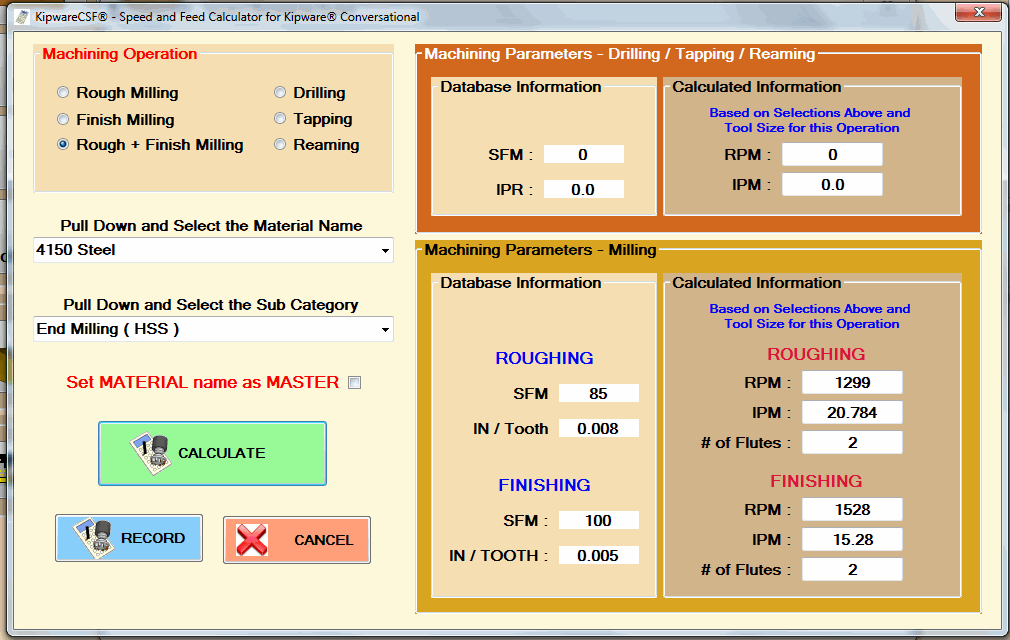
With the recent release of our KipwareCSF® - Machining Speed and Feed Wizard for Kipware® Conversational ... Kentech Inc. has begun the journey to allow users to build speed and feed databases whose information can easily be integrated into Kipware® conversational CNC programming software.

With our newest feature release ... KipwareCSF® also now gives our KipwareCYC® - Machining Cycletime Estimating Software users the power to import their cutting parameter database built in KipwareCYC® into KipwareCSF® and therefore into Kipware® conversational.

What does it all mean?
It means that cutting parameters utilized in KipwareCYC® to calculate machining cycletime ... can now be imported and used directly in Kipware® conversational when creating the G code programs to meet those estimates. This means that our core principal for accurate machining cycletime estimating is now even more enhanced ... the cutting parameters used when estimating will now be used directly in the machining G code programs.


Now that we have a basis for speed and feed calculations and integration with the release of KipwareCSF® ... we will continue to grow that app and add additional features ... calculations ... and power. In addition ... the role of KipwareCYC® and Kipware® conversational will continue to grow and intertwine.

If you are not on-board as a Kipware® user ... we invite you to invest some of your valuable time exploring our various Kipware® titles. For thousands of real world machine shops around the world ...  their explorations of Kipware® has been time well spent.

Kenney Skonieczny - President
Kentech Inc.

Friday, February 7, 2014

New Release - KipwareCSF® Machining Speed and Feed Wizard for Kipware® Conversational

Kentech Inc. is pleased to announce the release of our latest feature for Kipware® conversational CNC programming software ... KipwareCSF®.

KipwareCSF® is our machining speed and feed wizard for Kipware® conversational and will automatically calculate cutting parameters for conversational cycles based on a user defined cutting parameter database. This new STANDARD feature adds a tighter integration and auto-calculations for spindle speeds and cutting feedrates to Kipware® conversational.


The KipwareCSF® database is uniquely designed to be both easy to integrate and powerful with an unlimited capacity ... allowing the user complete control and greater flexibility than "book knowledge" speed and feed wizards.

KipwareCSF® calculations can be accessed inside ANY conversational menu in Kipware® conversational ... making auto-calculations of cutting parameters and auto-insertion of those parameters smooth, quick and easy.

We invite you to explore KipwareCSF® and all the latest features through our new introductory video ... just click the link below.
Please Click the ICON or CLICK HERE to view the KipwareCSF® Video

Kenney Skonieczny - President
Kentech Inc.

Thursday, January 23, 2014

New KipwareT® Feature Added - Conversational Knurling Menu

In response to a request from an existing KipwareT® - Conversational CNC Programming Software for Turning client ... we have released a new conversational menu ... O.D. Knurling.

Our client has encountered the need to program an O.D. Knurling operation more and more frequently as they have added a new part to their product line ... and since they use KipwareT® almost exclusively for the CNC programming of their Fanuc based Miyano CNC lathe ... they enquired to us if we could develop and add a conversational knurling menu to KipwareT®.

Always eager to add new features based on client "real world" input ... we developed a conversational knurling menu and are now including it STANDARD in all KipwareT® packages from 1-22-2014 on.


This new KipwareT® menu allows for quick and easy knurling operation programming and includes features for real world programming such :
  • selection of the desired knurling / cutting direction.
  • selection of the infeed / plunge feedrate
  • selection of the traverse feedrate
As stated earlier ... this new KNURLING menu is now included standard in KipwareT® as of 1-22-2014.

Kenney Skonieczny - President
Kentech Inc.


Dump the limited and underdeveloped 
G code "wizards" ...
GO PRO with Kipware® conversational !!

Thursday, December 12, 2013

New KipwareM® 4th Axis Conversational Engraving Feature Released

2013 might be in it's last days ... but we are determined to add to our accomplishments for the year. So the development here at Kentech Inc. goes on at breakneck speeds.

As we continue to receive feedback from our valued clients for our newly released 4th Axis Menu for KipwareM® ... we are pleased to announce the release of the 4th Axis Engraving option. This conversational menu will allow you to quickly and easily create G code programs for engraving along the OD of a circular part mounted in your 4th axis. This is a powerful menu that allows the user to quickly and easily set the following parameters using a simple fill-in-the-blank form :

  • HEIGHT of the text string
  • DISTANCE BETWEEN THE LETTERS in the text string
  • DIAMETER of the stock
With those simple inputs along with the user defined text string ... KipwareM® will perform all the calculations and create the complete G code programming to ENGRAVE the text string along the OD of the part including all X and rotary axis moves.


Simple ... Powerful ... No CAD or Drawing Required

Currently the operation is available for engraving along the X and rotary axis ( along the length of the part ) but will soon be available for engraving along the Y and rotary axis ( along the complete diameter of the workpiece ).

This new feature is now shipping standard as part of the included standard KipwareM® 4th Axis Menus.

Enjoy !!

Kenney Skonieczny - President
Kentech Inc.

Sunday, December 1, 2013

4th Axis Threading Added to KipwareM® 4th Axis Menus

At a request of one of our KipwareM® users ... we are pleased to announce the release of a new standard option to the KipwareM® 4th Axis conversational options.

The X/Y Thread Milling option allows users to program thread cutting using their 4th axis rotary table.


As with all KipwareM® conversational menus ... the XY Threading screen presents the user with many professional machining options such as :

  1. Ability to utilize multiple depths of cut to achieve the final depth
  2. Ability to designate + or - 4th axis rotation ... for both left and right hand threading
  3. Ability to define both roughing and finishing into the same cycle ... or create individual cycles for roughing and finishing
  4. Ability to select left-to-right or right-to-left cutting directions ... not only for right and left hand threading but also climb or conventional machining.
After some initial test cutting ... below are some pics of the results.

Initial Pass for a 10 TPI Thread
Finished Product
 As we continue towards years end ... it's been another BIG year of development and feature enhancements to all our Kipware® titles. Both KipwareM® and KipwareT® have seen major enhancements begging the question ... Isn't it time to DUMP the limited G code "wizards" ?? ... and GO PRO with Kipware® Conversational !!

Kenney Skonieczny - President
Kentech Inc.


Friday, November 22, 2013

Curved Surface Added to KipwareM® 3D Menu

As we continue our torrid development pace heading toward the year end ... we have released another new KipwareM® 3D conversational option developed from a KipwareM® user request.

Our user needed to machine a specific part for the Harley Davidson company and wanted a simpler way to create the G code program then having to trudge through his CAD/CAM system. Having dealt with Kentech Inc. on a prior project for some 3D machining ... he approached us again to see if we could develop a solution. We decided it was a perfect application to add to our KipwareM® 3D menu ... and we developed our CURVED SURFACE conversational option for KipwareM®'s 3D menu. Developed at NO CHARGE to our client might I add !!


As you can see from the screenshot above of the CURVED SURFACE conversational menu ... like all our Kipware® conversational menus ... it puts tons of options into the hands of the user. The user can define individual parameters for BOTH roughing and finishing machining such as depth of cut ... feedrates ... etc.. The surface can also be kicked off at any user defined angle ... like all KipwareM® options ... with a single Rotation Angle input !!


Above is a 3D plot of the sample result. This program for both roughing ( with a square end mill ) and finishing ( with a ball end mill ) was created in less than 1.5 minutes ... with NO drawing required !!

This new CURVED SURFACE menu is now shipping standard with the KipwareM® 3D option. For all the other 3D menu options available ... please see our Blog back-post : http://kentechinc.blogspot.com/2013/09/kipware-3d-conversational-programming.html

Thank you to all our customers for their input and support that enables us to continually update and enhance our REAL WORLD machine shop software .

Isn't it time to Dump the limited G Code Wizards and GO PRO ?
Kipware® Conversational are PROFESSIONAL programming
applications ... with built-in PROFESSIONAL features ...
that will help anyone machine like a PRO !!
Kenney Skonieczny - President
Kentech Inc.

Thursday, October 31, 2013

4th Axis Conversational Programming Now Available in KipwareM®

Have a full 4th axis on your CNC mill? If so the new features now available in KipwareM® will be of interest.

Due to customer requests ... we have added new conversational menu options that will cover the creation of G code programs for machining that can be accomplished with a 4th axis. As time goes on and additional requests are received ... we will add more "fan favorite" options.


The first menu option released is for XY Slotting. Some of the features available in this menu include :

  1. Straight slots or "twisted" slots.
  2. Easily create programs to machine multiple, evenly spaced slots ( straight or twisted ) by simply inputting the total number of slots and the angle between the slots.
  3. The user can select the cutting direction .... climb or conventional milling ... for both roughing and finishing.
  4. The user can select from a variety of machining options beyond just roughing and finishing including :
  • Zig-Zag cutting with Z ramping
  • Zig-Zag cutting with Z plunging
  • One-Way cutting with Z ramping
  • One-Way cutting with Z plunging
We are excited to be able to add this feature to KipwareM® and to start the process of building a complete and robust 4th axis option moving forward.
Do you have a machining operation you would like to see added? Rrop us a line at Sales@KentechInc.com and let us know the details. If we feel it would be a "fan favorite" ... we'll get it included in the next release.

Kenney Skonieczny - President
Kentech Inc.

Wednesday, October 30, 2013

Kentech Inc.'s C.S.D. Strategic Business Unit for Custom Software Development Goes Live

In the 25+ years of our existence, we have created hundreds of custom software applications from custom G code conversion applications to custom conversational CNC programming applications. In September 2013, due to increased customer demand for custom machine shop and CNC applications, we created our C.S.D. Strategic Business Unit to better concentrate developers and their resources on these custom applications. With this new SBU, we can insure your custom machine shop and CNC applications are developed professionally and intelligently and brought to your shop floor in the quickest and most efficient manner.

Our over 25+ years of metacutting, CNC and machine shop experiences enable us to "see" the shop floor and our clients problems with a clarity unmatched in manufacturing based software development. Our focus lies with our strengths ... in manufacturing ... in metacutting ... in CNC programming and in G code and G code creation. If you have ideas that you feel would benefit your shop ... we encourage you to contact the Kentech Inc. C.S.D. unit today and turn those IDEAS into INCREASED PRODUCTIVITY !!

The Kentech Inc. C.S.D. unit operates on the philosophy :

If you can DREAM it ... We can CODE it !!

For additional information, capabilities and to find out what the 
Kentech Inc. C.S.D. Unit can do for you ... 
please visit the C.S.D. website :


Kenney Skonieczny - President
Kentech Inc.


Thursday, October 24, 2013

SpaceX purchases Kipware® for their CA Manufacturing Facility

Kentech Inc. is pleased to announce the purchase of Kipware® software by SpaceX for use in their manufacturing facility in Hawthorne California.

The sale of (40) seats of Kipware® was finalized on October 23, 2013.


Welcome SpaceX to the Kipware® family of users !!

Kenney Skonieczny - President
Kentech Inc.

Wednesday, October 16, 2013

First Look - Conversational Y Axis Programming for Turning Centers

First look and development progress on theY AXIS CONVERSATIONAL PROGRAMMING module for KipwareT®

In late September we began development on the Y Axis Conversational Programming
module for KipwareT® - Conversational CNC Programmng Software for Turning. We have been steadily creating new menus and the accompanying toolpath generating code for Y axis milling operations such as pocketing, boss machining, thread milling and more ... with options to perform these machining operations on the FACE or OD of the workpiece.


The same proven-in-the-trenches milling toolpaths created through KipwareM® will soon be available for milling on Y axis turning centers.

In addition, revisions are being implemented into our KipwareTP® - Toolpath Plotting Software to accommodate Y axis toolpath plotting both on Z axis and X axis features.


Full release is scheduled for mid to late November 2013. Stay tuned to " ... In The Trenches" or watch for your November Kentech Inc. Newsletter for more details. If you're not signed up to receive the Kentech Inc. Newsletter ... which always contains our vastly popular Monthly Puzzler ... you can sign up here.

Kenney Skonieczny - President
Kentech Inc.

Thursday, October 10, 2013

New Training Video Available

We have added a new training video for Kipware® conversational covering the Kipware® conversational TREE and the cycle editing options available for cycles loaded into the tree.

This video also highlights some new options recently added and made available for cycle editing.

You can view all our videos through our YouTube channel : KTSoftware ... or by visiting the Kipware® Video Training page ... the link is directly available within all Kipware® conversational applications.

Kenney Skonieczny - President
Kentech Inc.

Monday, September 23, 2013

Two More NEW Conversational Features Released

"Winter is coming John Snow." ( for all the Game of Thrones fans )

Winter always seems to bring a flurry of development here at Kentech Inc. ... and we have started early. On the heels of our groundbreaking 3D Conversational release for KipwareM® ... we have released two more additional features.
Kipware® SketchPad :
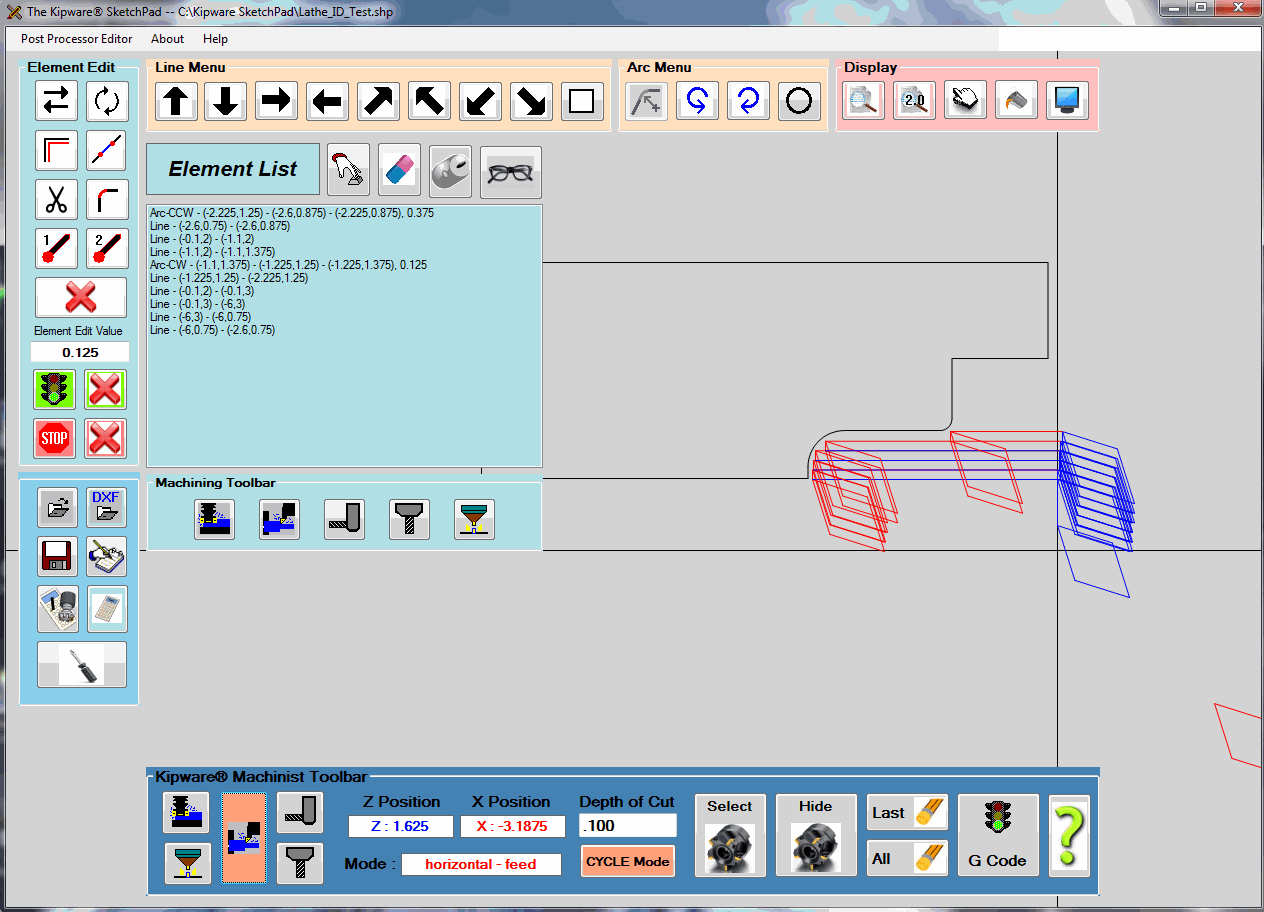
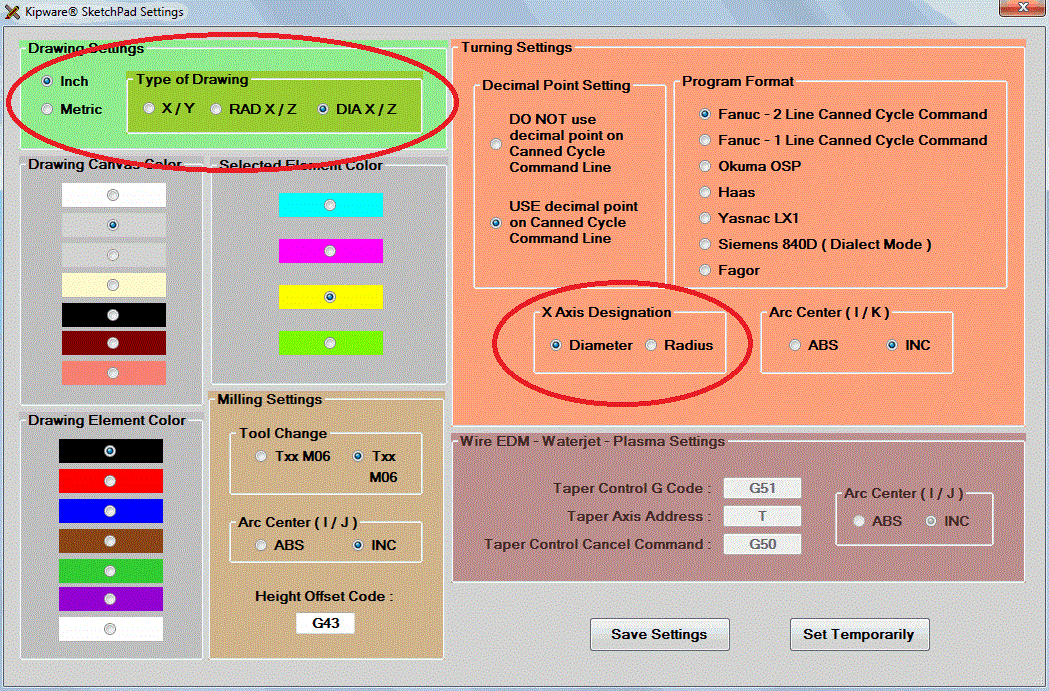
The SketchPad has always required drawing using X and Y coordinates ... even if you were drawing a part to be coded for a lathe. Of course the SketchPad would auto-convert everything and your G code would be either diameter or radius X lathe compatible ... but the actual drawing was done using X and Y coordinates.

The new feature released allows for separate designations for the G code output and now ... a designation for the type of coordinates to be used when drawing. Users can draw using either X-Y coordinates ... radius X - Z coordinates ... or diameter X - Z coordinates. This of course makes drawing a ton easier for "lathe people" ... while still giving you the opportunity to do something funky like ... draw with diameter X and have your G code come out in radius X !!! Pretty neat and very handy ... professional machinists will know what I mean.


KipwareM® 3D Rotation :
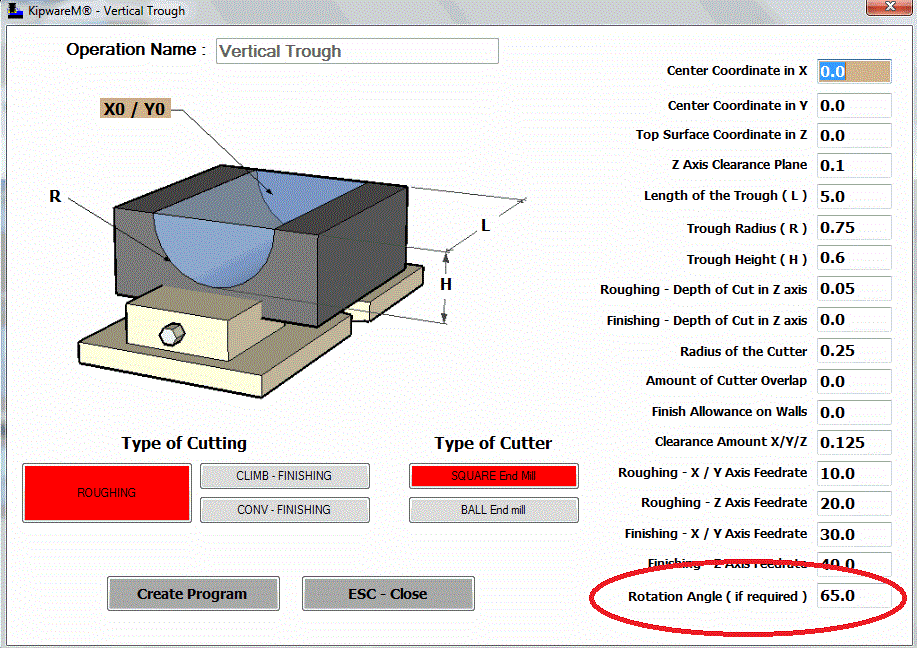
As with all the other menus in KipwareM® ... now the newly released 3D shapes can be ROTATED at any angle with just a simple user input. We have added a ROTATION field on the forms where the user can designate the rotation angle if so desired. Like all the 2D menus ... now the 3D shape can be auto-rotated with just a simple input.

So go ahead ... take that trough and machine it at 65 degrees !!


What's Coming Next :
We now turn our development attention to a feature that has been on my wish list. And since I'm the boss ... I get what I want !!

We have now begun the development of more Live Tool options for KipwareT® to better accommodate the wave of multi-axis turning centers. The next release will have FULL Y AXIS MILLING - ALL CONVERSATIONAL !! Stay tuned ... release will probably be around November.


We keep telling ya ....
Now more than ever ...
DUMP the G CODE WIZARDS !!!
GO PRO with Kipware® Conversational !!
( you don't get development like this from a "wizard " )
( it comes from professionals !! )


Kenney Skonieczny - President
Kentech Inc.