Showing posts with label cnc turning. Show all posts

Saturday, January 10, 2015

New Release : Shoulder Grooving for KipwareT®

Version 17.3.0 of our KipwareT® - Conversational CNC Programming System for Turning has been released and includes (2) new conversational options ... OD and ID Shoulder Grooving.


We define shoulder grooving as an operation that creates an undercut or groove where the "spindle side" of the groove has a larger diameter than the opposite wall. Although KipwareT® already contains many grooving options ... the OD and ID straight grooving considered that both the front and rear of the groove lie on the same diameter.

As with all Kipware® conversational options ... powerful machining toolpaths with complex machining operations can quickly and easily be created using simple keystrokes and inputs. One of the options available in shoulder grooving give the user the ability to specify how much material is to be removed from the rear face ... in essence pushing the rear face back as mush as desired. Other standard complex grooving options are included such as :
  1. Peck Grooving with Chip Break
  2. Peck Grooving with Complete Retraction
  3. Easily add CHAMFERS or RADII to one or both corners
  4. Select ROUGH and / or FINISH operations
KipwareT® OD Shoulder Grooving Option
KipwareT® ID Sholder Grooving Option
Version 17.3.0 with the new shoulder grooving option is shipping standard as of 01/12/15.

If you're using or considering limited, underdeveloped so called "wizards" ... we invite you to explore the Kipware® conversational system at www.KentechInc.com.

GO PRO ... BE A PRO ... with Kipware® conversational.

Kenney Skonieczny - President
Kentech Inc.


Friday, November 22, 2013

Curved Surface Added to KipwareM® 3D Menu

As we continue our torrid development pace heading toward the year end ... we have released another new KipwareM® 3D conversational option developed from a KipwareM® user request.

Our user needed to machine a specific part for the Harley Davidson company and wanted a simpler way to create the G code program then having to trudge through his CAD/CAM system. Having dealt with Kentech Inc. on a prior project for some 3D machining ... he approached us again to see if we could develop a solution. We decided it was a perfect application to add to our KipwareM® 3D menu ... and we developed our CURVED SURFACE conversational option for KipwareM®'s 3D menu. Developed at NO CHARGE to our client might I add !!


As you can see from the screenshot above of the CURVED SURFACE conversational menu ... like all our Kipware® conversational menus ... it puts tons of options into the hands of the user. The user can define individual parameters for BOTH roughing and finishing machining such as depth of cut ... feedrates ... etc.. The surface can also be kicked off at any user defined angle ... like all KipwareM® options ... with a single Rotation Angle input !!


Above is a 3D plot of the sample result. This program for both roughing ( with a square end mill ) and finishing ( with a ball end mill ) was created in less than 1.5 minutes ... with NO drawing required !!

This new CURVED SURFACE menu is now shipping standard with the KipwareM® 3D option. For all the other 3D menu options available ... please see our Blog back-post : http://kentechinc.blogspot.com/2013/09/kipware-3d-conversational-programming.html

Thank you to all our customers for their input and support that enables us to continually update and enhance our REAL WORLD machine shop software .

Isn't it time to Dump the limited G Code Wizards and GO PRO ?
Kipware® Conversational are PROFESSIONAL programming
applications ... with built-in PROFESSIONAL features ...
that will help anyone machine like a PRO !!
Kenney Skonieczny - President
Kentech Inc.

Monday, September 23, 2013

Two More NEW Conversational Features Released

"Winter is coming John Snow." ( for all the Game of Thrones fans )

Winter always seems to bring a flurry of development here at Kentech Inc. ... and we have started early. On the heels of our groundbreaking 3D Conversational release for KipwareM® ... we have released two more additional features.

Kipware® SketchPad :
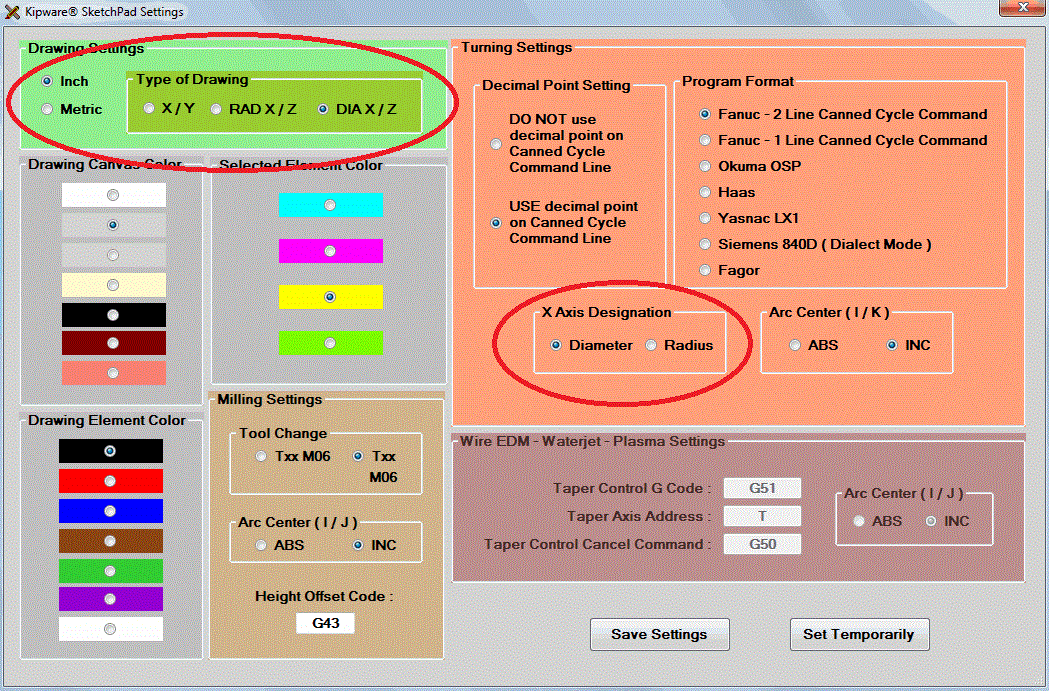
The SketchPad has always required drawing using X and Y coordinates ... even if you were drawing a part to be coded for a lathe. Of course the SketchPad would auto-convert everything and your G code would be either diameter or radius X lathe compatible ... but the actual drawing was done using X and Y coordinates.

The new feature released allows for separate designations for the G code output and now ... a designation for the type of coordinates to be used when drawing. Users can draw using either X-Y coordinates ... radius X - Z coordinates ... or diameter X - Z coordinates. This of course makes drawing a ton easier for "lathe people" ... while still giving you the opportunity to do something funky like ... draw with diameter X and have your G code come out in radius X !!! Pretty neat and very handy ... professional machinists will know what I mean.


KipwareM® 3D Rotation :
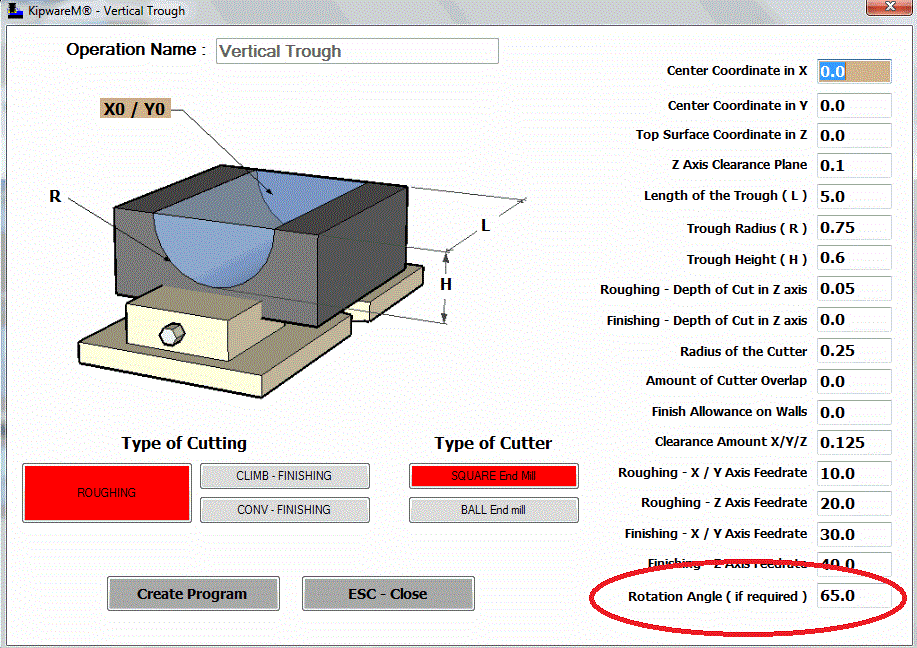
As with all the other menus in KipwareM® ... now the newly released 3D shapes can be ROTATED at any angle with just a simple user input. We have added a ROTATION field on the forms where the user can designate the rotation angle if so desired. Like all the 2D menus ... now the 3D shape can be auto-rotated with just a simple input.

So go ahead ... take that trough and machine it at 65 degrees !!


What's Coming Next :
We now turn our development attention to a feature that has been on my wish list. And since I'm the boss ... I get what I want !!

We have now begun the development of more Live Tool options for KipwareT® to better accommodate the wave of multi-axis turning centers. The next release will have FULL Y AXIS MILLING - ALL CONVERSATIONAL !! Stay tuned ... release will probably be around November.


We keep telling ya ....
Now more than ever ...
DUMP the G CODE WIZARDS !!!
GO PRO with Kipware® Conversational !!
( you don't get development like this from a "wizard " )
( it comes from professionals !! )


Kenney Skonieczny - President
Kentech Inc.

Thursday, August 22, 2013

Reason #4 - TOP 10 Reasons - WHY KIPWARE®? - Increased G Code Ouput

#4 In our Series of the TOP 10 Reasons ... WHY KIPWARE® is :
Increased G Code Output

Now one can deny that CAD/CAM is a great tool ... but for the 95% of G code created around the world every day ... simple milling, drilling, turning, grooving, threading, etc. ... IT'S OVERKILL !!

The fact is that most shops around the world are not programming aircraft parts or mold work on a day-to-day basis. And those are the type of jobs that CAD/CAM was designed to handle ... and it does it very well. Most shops are doing what we described above ... simple milling, drilling, turning, grooving, threading, etc. ... and CAD/CAM presents a lot of negatives for this type of work. Using your CAD/CAM system is not always your best programming option ... period. And to compete in today's world ... you programming requires an arsenal of tools ... not just a CAD/CAM system.

Here is the most glaring negative ... that DECREASES your G code output ... and the reason Kipware® conversational is a powerful tool in your programming arsenal.
  • CAD/CAM systems are complex ... no matter how EASY they tell you they are. Most have a wide array of menus, screens, options ... because they are needed for the complex stuff ... that makes both navigation and operation quite complex. And that means you need a qualified CAD/CAM operator ... and most likely not everyone in your shop will or can be a qualified CAD/CAM operator. In addition, CAD/CAM requires a drawing in order to create even the simplest G code program. A drawing is not always available ... which means one has to be created. Which means the operator has to have at least CAD experience. You don't need a drawing to machine a round pocket with a drilled and tapped bolt circle at the bottom. Drawing wastes valuable time ... time that could have been used creating and running G code ... making parts.That means your CAD/CAM system is removing good chipmakers from your programming process. Having only one or two people capable of producing your G code is a detriment to efficiency and productivity.
  • Kipware® is conversational and intuitive ... using plain English, fill-in-the-blank forms to gather the required data to create the G code program. This allows for easy creation of G code programs ... allowing users with no drawing or CAD/CAM background ... to create the G code for the simpler everyday jobs ... the majority of programming done in the real world everyday. This means increased efficiency and productivity. Kipware® does not require a drawing for those simpler, everyday programming. The conversational design of Kipware® conversational allows for easy and fast G code creation. If the part is more complex and it requires a drawing ... the built-in Kipware® SketchPad has an interface and layout that is more intuitive than CAD packages ... allowing non-CAD proficient operators to easily create sketches that can then be machined using a conversational menu. In addition ... the patent pending Machinist Mode in the SketchPad creates G code toolpaths by simply moving the mouse !!

Free your floor from the shackles of  CAD/CAM OVERKILL.

What does Increased G Code Output mean? It's simple ... more chips, more parts, more money. Realizing that your CAD/CAM system is not always the best programming alternative ... implementing Kipware® conversational into your system ... will break the chains that are holding back your productivity, your efficiency, and your G code output.

Kenney Skonieczny - President
Kentech Inc.

Monday, July 22, 2013

Easiest CAM Ever - Part Deux - CNC Turning

Easiest CAM ... for turning ... Ever?

Take a peak at our latest YouTube video featuring the Machinist Mode for the Kipware® SketchPad illustrating a CNC turning example.


Don't be fooled by the underdeveloped and severely limited "wizards" ... 
GO PRO with Kipware® !!


Kenney Skonieczny - President
Kentech Inc.