Showing posts with label conversational g code wizards. Show all posts

Monday, January 26, 2015

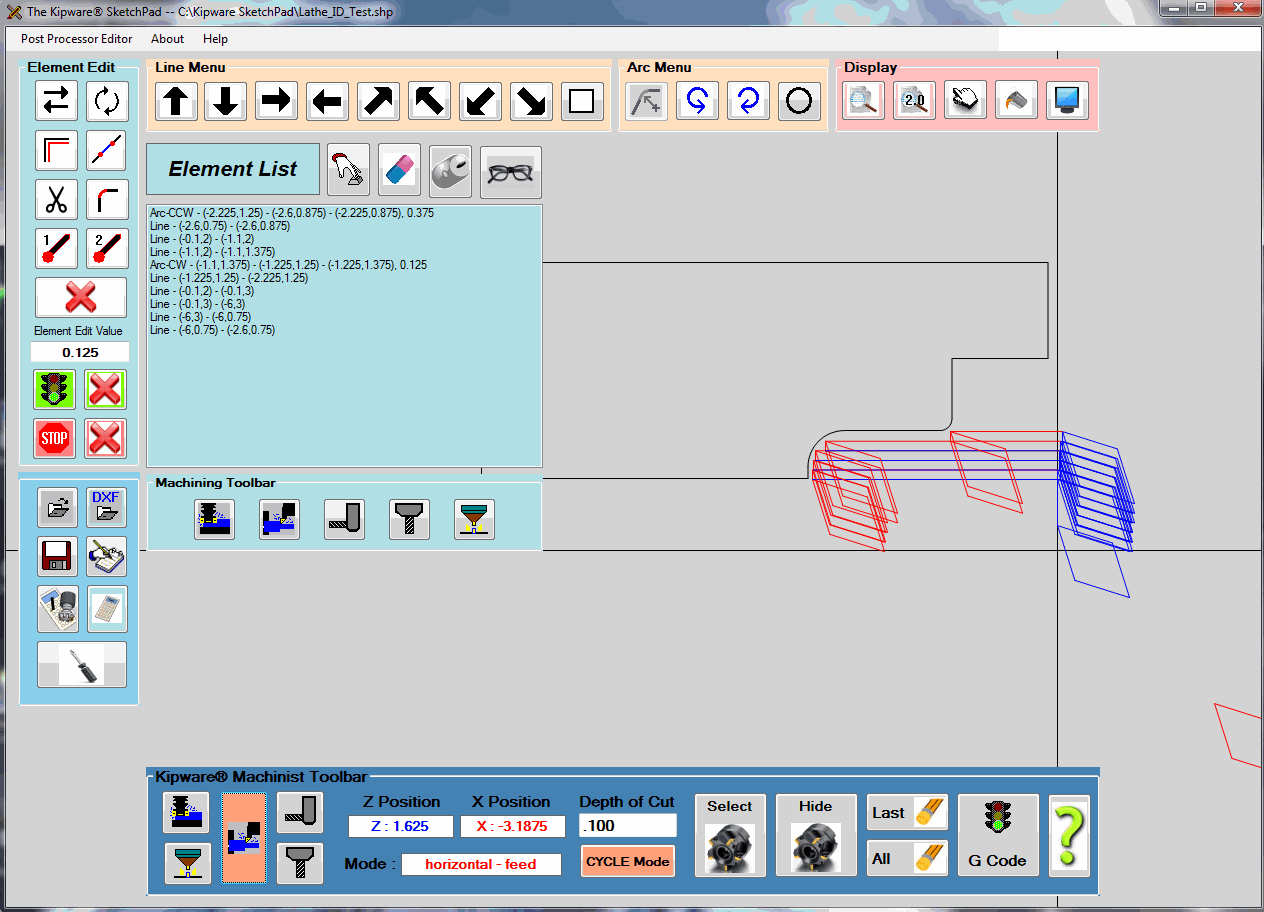
New Release : Kipware® SketchPad Machinist CYCLE Mode

Kentech Inc. is pleased to announce the release of the CYCLE MODE for the Kipware® SketchPad - Conversational CAD/CAM application. The new Kipware® SketchPad ... Version 11.0.0 ... is available STANDARD with ALL Kipware® Conversational CNC Programming titles and also is available as a stand-alone application.


The MACHINIST MODE in the Kipware® SketchPad is our unique toolpath creation function that allows users to create G code programs for ANY shape and pattern by simply moving and double-clicking the mouse ... which is an on-screen simulation of a user defined cutting tool.  Using RAPID, FEED, HORIZONTAL, VERTICAL, FREE HAND and now CYCLE modes ... users can quickly and easily create G code programs that has them in complete control of the cutting toolpath. No complex menus and no complex commands ... just move the mouse and double-click to record.

The new CYCLE mode adds even more control by allowing the user to control the DEPTH OF CUT with simple keystrokes of the keyboard ARROW keys. These keys combined with the RAPID and FEED modes allow for the fast and easy creation of ROUGHING toolpaths for ANY type of contour or shape.

The video below illustrates both the MACHINIST mode and new CYCLE mode in more detail :


For additional information on Kipware® conversational titles 
as well as the Kipware® SketchPad ... 
please visit our website : www.KentechInc.com

Kenney Skonieczny - President
Kentech Inc.


Tuesday, October 7, 2014

Enhanced DXF Import for the Kipware® SketchPad

Kentech Inc. has released the latest version of the Kipware® SketchPad ... Version 10.1.2 ... that contains enhanced DXF import capabilities as well as new algorithms for the auto-connect feature.

Version 10.1.2 enhances the ability of users to import DXF files and then create G code toolpaths to machine those DXF shapes through the SketchPad's Machinist Mode and also through the auto-connect feature in the SketchPad.

In addition to the enhanced DXF import capabilities ... improvements and enhancements have also been released to the auto-connect feature through which the SketchPad connects elements in the sketch to create a connected contour toolpath. Using this feature ... the user selects the first and last element in the contour ... and the SketchPad calculates and auto-connects all elements that make up the connected contour between that first and last element. DXF files ... being somewhat un-precise as far as the decimal precision of the files exported ... can often make the job of connecting elements extremely tough. New algorithms and calculations contained in this new release give the SketchPad enhanced capabilities when finding elements to connect.

Additional information on Kipware® conversational and the Kipware® SketchPad can be found on our website ... www.KentechInc.com.

Kenney Skonieczny - President
Kentech Inc.

Monday, January 27, 2014

New Conversational CNC Programming for Milling Training Video Posted

In response to a new KipwareM® client that needed some additional pointers in programming with KipwareM® ... we have recently posted an approximately 30 minute video that outlines many of the more common programming options available in KipwareM®.

The workpiece to be programmed is a bracket ... .500" inch thick CRS. The video outlines the drilling, pocket milling and contour milling using the Kipware® SketchPad required for the complete machining of the bracket.
The video is available through our YouTube channel ... JUST CLICK THE IMAGE ABOVE

Kenney Skonieczny - President
Kentech Inc.

Another example of why you should dump the 
limited, underdeveloped G code wizards ...
and GO PRO with Kipware® Conversational

Thursday, October 31, 2013

4th Axis Conversational Programming Now Available in KipwareM®

Have a full 4th axis on your CNC mill? If so the new features now available in KipwareM® will be of interest.

Due to customer requests ... we have added new conversational menu options that will cover the creation of G code programs for machining that can be accomplished with a 4th axis. As time goes on and additional requests are received ... we will add more "fan favorite" options.


The first menu option released is for XY Slotting. Some of the features available in this menu include :

  1. Straight slots or "twisted" slots.
  2. Easily create programs to machine multiple, evenly spaced slots ( straight or twisted ) by simply inputting the total number of slots and the angle between the slots.
  3. The user can select the cutting direction .... climb or conventional milling ... for both roughing and finishing.
  4. The user can select from a variety of machining options beyond just roughing and finishing including :
  • Zig-Zag cutting with Z ramping
  • Zig-Zag cutting with Z plunging
  • One-Way cutting with Z ramping
  • One-Way cutting with Z plunging
We are excited to be able to add this feature to KipwareM® and to start the process of building a complete and robust 4th axis option moving forward.
Do you have a machining operation you would like to see added? Rrop us a line at Sales@KentechInc.com and let us know the details. If we feel it would be a "fan favorite" ... we'll get it included in the next release.

Kenney Skonieczny - President
Kentech Inc.