Showing posts with label conversational CNC software. Show all posts

Monday, April 27, 2015

New Release - Game Changing OD & ID Turning Menus for KipwareT®

Kentech Inc. is proud to continue the Kipware® conversational tradition of raising the bar for conversational CNC programming software with the release of Version 18.0.0 of KipwareT - Conversational CNC Programming Software for Turning.

Version 18 contains many new under-the-cover code upgrades but the main focus is on the vastly updated and enhanced OD Turning and ID Boring menus. The previous version was quite limiting in both corner chamfer and radii options as well as the type of machining G code output that was available. The new and enhanced menus kick the "simple turning" concept up a notch ... and allows users to quickly and easily create G code for complex shapes ... that can contain multiple different tapers and radii on an unlimited number of levels.


Below are a list of the key features ... available in both OD TURNING and ID BORING menus.
  • Unlimited Number of Diameters / Faces : whereas the previous version and most limited G code wizards limit the number of diameters and faces that can be included in this type of menu ... the new KipwareT® menu gives the user the ability to define an UNLIMITED number of diameter and faces for machining.
  • Any Radii - Any Angle : each "section" is defined using three corners ... with one corner always the same as the adjoining element. Corners 1 and 3 can contain either a radii or chamfer ... the chamfer having any angle and any length as defined by the user. The radii is also completely user defined. Corner 2 can also have any user defined radii between the (2) diameters.
  • Not Just Corner Breaks : corner 1 and 3 are not just corner breaks ... only machined on the finish pass. All corner machining is included in the ROUGHING toolpath ... which allows for the machining of big and robust chamfers and radii ... not just simplistic corner breaks.
  • Powerful Feature Editing : any feature can easily be edited or altered completely. Quickly and easily change from 45 degree chamfers to full corner radii ... all conversationally.
  • Multiple Types of  Machining Options Available : Machining is available either using a turning or facing type machining ... and roughing and or finishing is available for both types. Users can define any combination of the four to complete the part machining.
  • Multiple Output Formats Available : G code can be output using long hand G code or canned cycle format supporting all models of Fanuc and Okuma formats.
  • Cutter Compensation is Automatic : either long hand G code or canne3d cycle output always automatically includes cutter compensation including the start up block and cancel block ... all output automatically.
  • Cycles Can be Easily Re-Loaded : as with all Kipware® conversational cycles ... any created cycle can be re-loaded from disk and easily edited or altered ... including all chamfer and radii definitions ... in the conversational form.
Below is the recently released KipwareT® - Version 17 Release Video 
from our YouTube Channel :


Below is the link that will enable you to view these ground-breaking menus 
in action in a sample programming video :


Version 17.0.0 of KipwareT® will be shipping standard as of Wednesday ... April 29th.
These new menu options are UNMATCHED in the industry ... whether when compared to any conversational CNC control based application ... or any conversational type wizard programming application. Which begs the question ... WHY SETTLE? Go Pro ... Be a Pro ... with Kipware® Conversational.

Kenney Skonieczny - President
Kentech Inc.


Friday, February 20, 2015

New Release - Conversational 3D BOWL Shape Menu Released for KipwareM®

Kentech Inc. is continuing our ground-breaking conversational 3D shape development and we are pleased to announce the release of Version 16.5.0 of our KipwareM® - Conversational CNC Programming Software for Milling. With this version release we add a new 3D menu to the 3D Options ... BOWL shape machining.


Kipware® conversational is the ONLY conversational programming software on the market ... PC based or machine control based ... that offers conversational 3D shape programming for standard type shapes.

The 3D BOWL shape is now included along with the current 3D options :
  1. Tapered Cone
  2. Tapered Hole
  3. Tapered Boss
  4. Tapered Pocket
  5. Horizontal Trough
  6. Vertical Trough
  7. Curved Surface
As with all Kipware® conversational programming ... through a simple fill-in-the-blank form, the user can define the dimensions of the bowl as well as the cutting parameters and machining operations ... and KipwareM® will automatically create the G code program.


Some of the more powerful options available for this menu include :
  1. User defined ROUGHING or FINISHING or BOTH
  2. Select to have the machining performed with a SQUARE or BALL END MILL
  3. Separate user defined depth of cut in Z for BOTH Roughing and Finishing
  4. Separate cutting parameters ( RPM/ Feedrate ) for BOTH Roughing and Finishing
The 3D BOWL shape option is now shipping standard with KipwareM® when the 3D Option is selected at the time of purchase.

For more information on all the Kipware® conversational title ... please visit the link below :
http://www.kipware.com/

To schedule a LIVE online demonstration of any of our Kipware® title ... please visit the link below :
http://www.kentechinc.com/livedemo.shtml

To watch our in-depth videos on any of our Kipware® titles ... please visit our YouTube channel :
https://www.youtube.com/user/KTSoftware

Kenney Skonieczny - President
Kentech Inc.


Monday, January 26, 2015

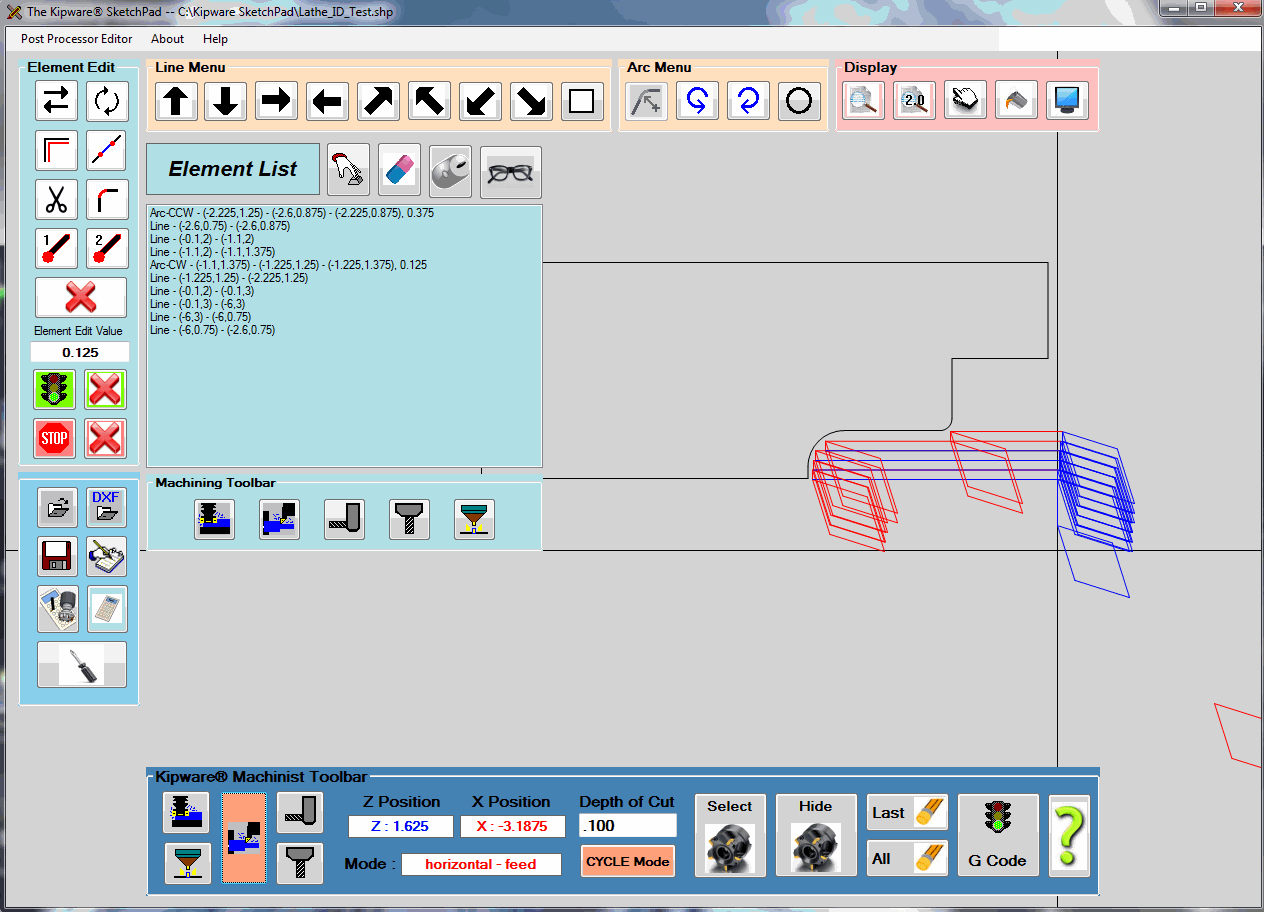
New Release : Kipware® SketchPad Machinist CYCLE Mode

Kentech Inc. is pleased to announce the release of the CYCLE MODE for the Kipware® SketchPad - Conversational CAD/CAM application. The new Kipware® SketchPad ... Version 11.0.0 ... is available STANDARD with ALL Kipware® Conversational CNC Programming titles and also is available as a stand-alone application.


The MACHINIST MODE in the Kipware® SketchPad is our unique toolpath creation function that allows users to create G code programs for ANY shape and pattern by simply moving and double-clicking the mouse ... which is an on-screen simulation of a user defined cutting tool.  Using RAPID, FEED, HORIZONTAL, VERTICAL, FREE HAND and now CYCLE modes ... users can quickly and easily create G code programs that has them in complete control of the cutting toolpath. No complex menus and no complex commands ... just move the mouse and double-click to record.

The new CYCLE mode adds even more control by allowing the user to control the DEPTH OF CUT with simple keystrokes of the keyboard ARROW keys. These keys combined with the RAPID and FEED modes allow for the fast and easy creation of ROUGHING toolpaths for ANY type of contour or shape.

The video below illustrates both the MACHINIST mode and new CYCLE mode in more detail :


For additional information on Kipware® conversational titles 
as well as the Kipware® SketchPad ... 
please visit our website : www.KentechInc.com

Kenney Skonieczny - President
Kentech Inc.


Saturday, January 10, 2015

New Release : Shoulder Grooving for KipwareT®

Version 17.3.0 of our KipwareT® - Conversational CNC Programming System for Turning has been released and includes (2) new conversational options ... OD and ID Shoulder Grooving.


We define shoulder grooving as an operation that creates an undercut or groove where the "spindle side" of the groove has a larger diameter than the opposite wall. Although KipwareT® already contains many grooving options ... the OD and ID straight grooving considered that both the front and rear of the groove lie on the same diameter.

As with all Kipware® conversational options ... powerful machining toolpaths with complex machining operations can quickly and easily be created using simple keystrokes and inputs. One of the options available in shoulder grooving give the user the ability to specify how much material is to be removed from the rear face ... in essence pushing the rear face back as mush as desired. Other standard complex grooving options are included such as :
  1. Peck Grooving with Chip Break
  2. Peck Grooving with Complete Retraction
  3. Easily add CHAMFERS or RADII to one or both corners
  4. Select ROUGH and / or FINISH operations
KipwareT® OD Shoulder Grooving Option
KipwareT® ID Sholder Grooving Option
Version 17.3.0 with the new shoulder grooving option is shipping standard as of 01/12/15.

If you're using or considering limited, underdeveloped so called "wizards" ... we invite you to explore the Kipware® conversational system at www.KentechInc.com.

GO PRO ... BE A PRO ... with Kipware® conversational.

Kenney Skonieczny - President
Kentech Inc.


Wednesday, January 7, 2015

New KipwareT® Option in Development

Proud to say we are starting out the New Year with the same aggressive development as we have shown right along. On 1/7 we started development for (2) new options soon to be standard in KipwareT® - our conversational CNC programming software for turning.


These new options are for conversational programming of what we are referring to as "shoulder grooves" ... both on the OD and ID. These would be applicable for the type of groove where one face of the groove is up against a larger diameter than the opposite face of the groove. With many options available ... this fill-in-the-blank menu will have the capability to create fairly complex machining toolpaths from a variety of user inputs.

Stay tuned ... release is set for Friday ... 1/9/2015.

Kenney Skonieczny - President
Kentech Inc.


Don't Be Fooled by limited, under-developed, so-called G Code "Wizards" ...
Go Pro with Kipware® Conversational !!

Tuesday, October 7, 2014

Enhanced DXF Import for the Kipware® SketchPad

Kentech Inc. has released the latest version of the Kipware® SketchPad ... Version 10.1.2 ... that contains enhanced DXF import capabilities as well as new algorithms for the auto-connect feature.

Version 10.1.2 enhances the ability of users to import DXF files and then create G code toolpaths to machine those DXF shapes through the SketchPad's Machinist Mode and also through the auto-connect feature in the SketchPad.

In addition to the enhanced DXF import capabilities ... improvements and enhancements have also been released to the auto-connect feature through which the SketchPad connects elements in the sketch to create a connected contour toolpath. Using this feature ... the user selects the first and last element in the contour ... and the SketchPad calculates and auto-connects all elements that make up the connected contour between that first and last element. DXF files ... being somewhat un-precise as far as the decimal precision of the files exported ... can often make the job of connecting elements extremely tough. New algorithms and calculations contained in this new release give the SketchPad enhanced capabilities when finding elements to connect.

Additional information on Kipware® conversational and the Kipware® SketchPad can be found on our website ... www.KentechInc.com.

Kenney Skonieczny - President
Kentech Inc.
Monday, August 18, 2014

New Release : Auto-Trim and Filleting for the Kipware® SketchPad

Kentech Inc. is pleased to announce the release of Version 10 of the Kipware® SketchPad - our Conversational CAD/CAM application that is available either as a stand-alone application and is also included standard with all Kipware® Conversational titles.

Version 10 is released with many new features "under the hood" ... but also a couple not so hidden ones as a response to client requests. If you follow us on Twitter ( @Kipware ) Facebook or through our Blogs ... you know that no machine shop software developer works harder to bring new features and new development to market more than Kentech Inc.. We are constantly publishing blog posts outlining our tons of new releases for all our software titles. As we continue the development of the Kipware® SketchPad into a more powerful drawing package ... we are also balancing the ease-of-use into our development. That thoughtful development has led us to two powerful and sought after features in a drawing package into this Version 10 SketchPad release.


TRIM : The new TRIM feature allows the users to simple select the (2) elements from the Element List box ... and have the SketchPad automatically determine the intersecting point of (2) entities and trim the excess from those entities at their auto-calculated intersecting point.


FILLET : The new FILLET feature works similar to the TRIM feature outlined above ... except will not only trim the entities but will also add a user defined radius between the (2) entities.


You can watch a video presentation of these new features on our 
YouTube Channel : KTSoftware


These new features are shipping standard in the Kipware® SketchPad ... which is included with all Kipware® Conversational titles ... as of August 18, 2014.

Kenney Skonieczny - President
Kentech Inc.


Don't Be Fooled by limited, under-developed, so-called G Code "Wizards" ...
Go Pro with Kipware® Conversational !!

Monday, July 21, 2014

Programming with Kipware® Software - Press Parts to Tesla Parts

As we have stated many times ... we are extremely proud of the fact that thousands of machine shops around the world have found a productive, efficient, steady and reliable solution to their manufacturing needs through our Kipware® software. We love to hear about those real world situations where Kipware® software is making a difference.

Last week we had the privilege of working closely with two of our clients who were in the middle of those "gotta have it tomorrow" projects ... creating CNC programs for two very different machining projects.

Problem #1 - Creating Parts for a Tesla Automobile
Simultaneously while working on the issue below ... we also had a client contact us who was in the midst of a rush programming project .... programming a contour to machine a part that would eventually be used in the Tesla electric car. Although they had been using the conversational module of Kipware® conversational for years to program their "standard" parts ... this particular part required a no-traditional contour be programmed ... and required the use of the Kipware® SketchPad. Not having too much experience and in a rush to get their parts made ... we stepped in and up.

The Solution :
The client emailed a DXF file of the contour ... and using our Kipware® SketchPad we created the G code program to machine the parts. It was great to have the opportunity to utilize the software we created to create a real world G code program to machine a real world part. And the coolest part was that it was for Tesla car ... although Elon Musk's SpaceX is already a member of the Kipware® family with (40) seats of Kipware® in their Hawthorne California manufacturing facility.

Problem #2 - Small Part Programming
As mentioned ... while working on the project above ... we were also called into action to support another small manufacturer client who was working to create a one-off specialty item for their customers. They were creating their program using Kipware® conversational ... and found the machine doing some strange movements when executing the G code program. Unable to diagnose the issue ... it was something they never experienced before ... they submitted a Support Ticket through our Helpdesk and asked for our assistance. The problem was new to us as well ... and required we talk directly by phone to get more information and lend some deeper assistance. It turned out that the client was new to CNC programming ... had been using Kipware® conversational for quite a while and getting all their programming done with Kipware® quite nicely ... but were now experiencing a little more complex part and programming that was getting a bit more complex ... mainly dealing with cutter compensation. Long story short ... their machine had some specific requirements and the program being created by Kipware® using standard cutter comp programming was causing the generation of some errors by the control.

The Solution :
We worked with the client suggesting some alternative G code programming solutions ... explaining how to create the revised G code and why ... to try a few different scenarios to diagnose the issue. Once the issue was diagnosed and an alternative G code model created that worked ... in less than (2) hours we had revised Kipware® to include a new, user selectable alternative option for cutter compenstion output ... and had an UPGRADE installation ready and available for the user to download. It was great working hand-in-hand with the client ... both teaching and helping them program ... and creating some newer features for our Kipware® conversational based on their real world inputs.

As you can see from the scenarios above ... Kentech Inc. is more than committed to our software support ... we are committed to our clients. This is just a small sample, a couple of scenarios from one week in our business life. These types of scenarios are repeated quite often here ... and we're always happy to jump in and assist in any way possible. And it's especially rewarding as we get to go into the "real world" ... on the shop floor ... and help make some chips !!

Kenney Skonieczny - President
Kentech Inc.


Wednesday, May 14, 2014

New Release : Enhanced Integration for KipwareTP® - CNC Toolpath Plotting Software

Kentech Inc. has released version 9.2.0 of our KipwareTP® - Editor and CNC Toolpath Plotting software.

Along with enhanced performance features ... this version includes a tighter integration between the full KipwareTP® text editor ... and the Plotbox where the G code to be plotted to the screen is stored. One of the unique features of KipwareTP® is the ability of the user to edit / alter the G code to be plotted directly in the Plotbox ... editing the G code "on the fly". When the full Editor is being used ... previous versions required the user to SAVE the edited file before loading it into the Plotbox. Version 9.2.0 includes a new option in the Editor that will automatically send the current contents of the Editor directly to the Plotbox in one step ... saving of the file is not required first.


KipwareTP® eliminates all the fluff, hassle and inconvenience of full blown simulation software and offers the Real World CNC programmer a fast, efficient and effective tool for G code verification. KipwareTP® is sold as a stand alone application and is also included free as a companion application with all Kipware® conversational software.

Kenney Skonieczny - President
Kentech Inc.
Dump the Limited, Under-developed, Not Supported so called "G Code Wizards"
Go Pro with Kipware® Conversational !!

Friday, May 9, 2014

New Releases for KipwareM® and Kipware® SketchPad

Kentech Inc. is pleased to announce the release of new features for both KipwareM® - Conversational CNC Programming Software for Milling and the Kipware® SketchPad - Conversational CAD/CAM Software.

Kipware® SketchPad :
New feature released regarding the Element List Box that include :
  • Ability to scroll through the elements in the listbox and have the element highlighted out in the drawing during scrolling.
  • Ability to highlight an element in the listbox ... press the E key ... and then edit the element for revision.
  • You can review these features in video format by CLICKING HERE or by going to the Kipware® Video Training webpage.

KipwareM® :
New DXF import feature released :
  • Added the ability to import point / hole locations from a DXF file into the hole locations in the conversational HOLE menu.
  • All POINT entities in the DXF will be auto-imported as X/Y hole locations and will be auto-added to the list of holes to be included in the G code program / cycle.


All features as listed above are shipping standard for KipwareM® as well as the Kipware® SketchPad as of 5/9/2014.


Kenney Skonieczny - President
Kentech Inc.


Don' be fooled by simple, limited, under-developed
G code "wizards" ...
Go Pro with Kipware® Conversational !!

Tuesday, April 1, 2014

New Release - 4th Axis Taper Slotting Menu

We continue to build on our strong foundation of 4th Axis Conversational Menus in our KipwareM® - Conversational CNC Programming Software for Milling. The latest conversational menu release comes by way of a current user who was seeking an easier way to program taper slots for lightening rifle barrels. We had previously developed and released STRAIGHT and TWISTED SLOTTING menus ... and this new release allows for straight slots that are tapered in the Z axis while cutting along the X axis.


This new menu contains many options allowing for greater flexibility including :
  1. Single or Double Tapers are available.
  2. Zig-Zag or One-Direction cutting can easily be selected.
  3. The user can include any number of slots along the OD periphery ... all from a single menu.
  4. Roughing and / or Finishing can be included in a single operation ... or split into two operations.
As with all the 4th Axis Conversational Menus ... this new menu is also included FREE with all KipwareM® purchases.


Kenney Skonieczny - President
Kentech Inc.

Don't Be FOOLED by the underdeveloped so-called G CODE WIZARDS ...
GO PRO ... with Kipware® Conversational

Tuesday, March 25, 2014

Software Version Numbers ... And The Story They Tell

Although there is no "law" in the software industry pertaining to Version Numbering ... nor what convention requires following ... most major software developers follow the "standard" system of X-Y-Z or Major.Minor.Patch.


Most often you will see software with version numbers such as 3.1.2 or 5.1.0. As mentioned above the FIRST digit is the MAJOR version number ... SECOND digit is MINOR version number ... and THIRD digit is the PATCH or sometimes referred to as the BUILD version number. So what does it all really mean?

MAJOR version numbers change when something significant is rolled out ... new features ... major enhancement ... etc.

MINOR version numbers change when minor changes are made to a release ... minor feature release ... the title basically stays the same with some minor feature enhancements.

PATCH version numbers change when a bug fix or patch is released to repair or correct a bug for a previous version that has been released to the public.


What Story Can Version Numbers Tell to the Consumer?
As far as a consumer is concerned ... version numbers can go beyond just indicating what "model" of the software they are about to purchase or that is in their possession. Version numbers also tell the life story of that software title. As a consumer ... what could they mean for you? Some examples :

(1) Low MAJOR version numbers probably indicate that not a lot of work or enhancements have been developed for the title. If the title has been on the market for say 5-6 years and the major version is still 1 or 2 ... that means there has been less than 1 major release every 2-2.5 years. Not much movement there. Either not many new ideas or not much interest in moving forward.

(2) High MINOR version numbers most likely also means that there are no new ideas on the table. Development has been devoted to slight improvements in the product but no new cutting edge ideas have been developed that would trigger a major release. Again ... the length of time the title has been on the market and the MINOR version number will work together to indicate this inside story.

(3) High PATCH version numbers can tell a deeper tale. Obviously ... if the patch version numbers are high the title has had a lot of issues and the developers have had to release multiple bug fixes and patches to fix those issues. Sure they may be fixing the issues ... but it doesn't project an air of confidence in either the development or the testing.

Just a note on BETA testing as well. BETA testing is performed on a software title prior to release to the public. This is the general way smaller software companies put a title out there so BETA users can use it and report back bugs or other issues that need to be corrected. Smaller developers use this method because most likely they don't have the staff to perform in-depth BETA testing in-house ... or perhaps they are creating software outside the realm of their market experience. In our business ... non-machinists developing software for the machinist. In reality ... the longer the title is in BETA testing ... the bleaker the outlook for a quality product release. Is it because the design is all wrong to begin with? Too many bugs causing release delays? Can't get the features right? Whatever the reason ... long periods of BETA testing usually indicate issues that will follow the title to release and beyond.

How About Kentech Titles and Development?
Here at Kentech Inc. we do follow the Major.Minor.Patch version numbering system. We invite you to take a look at the version numbers for our software titles ... and see the reflection of the pace of our general development .... the pace of ground-breaking major releases ... and the number of patches or builds that accompany those releases. Below is a listing of some of our MAJOR titles ... their life span and version numbers.

KipwareM® - Conversational CNC Programming Software for Milling
Initial Release Date : 1999
Current Version Number : 16.1.0

KipwareT® - Conversational CNC Programming Software for Turning
Initial Release Date : 2001
Current Version Number : 17.0.1

KipwareQTE® - Machine Shop Job Costing and Estimating Software 
Initial Release Date : 1996
Current Version Number : 12.3.2

KipwareCYC® - Machining Cycletime Estimating Software
Initial Release Date : 2007
Current Version Number : 5.2.3

In addition ... here are couple of links that outline our development and releases for the years 2013 and 2012 where you can get a quick report on all the releases for that calendar year.

2013 Development Report :
http://kentechinc.blogspot.com/2013/12/yearly-development-report-wow.html

2012 Development Report :

Conclusion ...
We are proud of our achievements ... many have been ground-breaking in our particular market sector. And we are proud to lay out those achievements for all to observe. In both this BLOG and in our software titles and version numbering system as well.

I hope that this short article has assisted you in becoming a little more of an educated consumer pertaining to your software purchases. Because at Kentech Inc. we live with the motto made famous by a local New England clothing store ... "An educated consumer is our best customer."

Kenney Skonieczny - President
Kentech Inc.

Thursday, January 23, 2014

New KipwareT® Feature Added - Conversational Knurling Menu

In response to a request from an existing KipwareT® - Conversational CNC Programming Software for Turning client ... we have released a new conversational menu ... O.D. Knurling.

Our client has encountered the need to program an O.D. Knurling operation more and more frequently as they have added a new part to their product line ... and since they use KipwareT® almost exclusively for the CNC programming of their Fanuc based Miyano CNC lathe ... they enquired to us if we could develop and add a conversational knurling menu to KipwareT®.

Always eager to add new features based on client "real world" input ... we developed a conversational knurling menu and are now including it STANDARD in all KipwareT® packages from 1-22-2014 on.


This new KipwareT® menu allows for quick and easy knurling operation programming and includes features for real world programming such :
  • selection of the desired knurling / cutting direction.
  • selection of the infeed / plunge feedrate
  • selection of the traverse feedrate
As stated earlier ... this new KNURLING menu is now included standard in KipwareT® as of 1-22-2014.

Kenney Skonieczny - President
Kentech Inc.


Dump the limited and underdeveloped 
G code "wizards" ...
GO PRO with Kipware® conversational !!

Thursday, January 2, 2014

Happy New Year !!

Our first post of 2014 goes out to our incredible customers and supporters ... to whom we send a number of THANK YOU's !!.


Thank you for making 2013 the BIGGEST year ever for Kentech Inc.. Our business expanded exponentially with a record number of seats installed ... while our software return rate continues to plummet. Out of that record number of sales ... we had (3) returns in 2013!! For us that tells the story ... users are purchasing our software in record numbers ... and our vision and development work continues to be right on target. Thank you so much for your support ... and we pledge to continue to raise our bar for Real World Software Development higher and higher in 2014.

Thank you for your commitment to manufacturing ... it's people like you and shops like yours that keep our industry vibrant, exciting, relevant and on track for constant improvement.

Thank you for your valuable inputs and suggestions that help keep our products REAL WORLD and targeted. Keep those cards and letters coming !!

We are totally energized after such a fabulous 2013 ... 
and we are ready to ROCK and SHOCK in 2014 !!
We wish all a healthy and prosperous 2014 !!

Kenney Skonieczny - President
Kentech Inc.

Thursday, December 19, 2013

Kipware® is Going to India !!

Kentech Inc. is pleased to announce the finalization of our distribution agreement with Jayashree Enterprises for distribution of Kipware® software in India. Jayashree Enterprises will operate in the Indian states Mahastra, Gujrat, Karnatak and Chennai distributing a wide array of Kipware® titles.

We welcome this new adventure in India and look forward to a long and prosperous relationship with Mr. Venkatesh Kulkarni and Jayashree Enterprises.

Kenney Skonieczny - President
Kentech Inc.

Thursday, December 12, 2013

New KipwareM® 4th Axis Conversational Engraving Feature Released

2013 might be in it's last days ... but we are determined to add to our accomplishments for the year. So the development here at Kentech Inc. goes on at breakneck speeds.

As we continue to receive feedback from our valued clients for our newly released 4th Axis Menu for KipwareM® ... we are pleased to announce the release of the 4th Axis Engraving option. This conversational menu will allow you to quickly and easily create G code programs for engraving along the OD of a circular part mounted in your 4th axis. This is a powerful menu that allows the user to quickly and easily set the following parameters using a simple fill-in-the-blank form :

  • HEIGHT of the text string
  • DISTANCE BETWEEN THE LETTERS in the text string
  • DIAMETER of the stock
With those simple inputs along with the user defined text string ... KipwareM® will perform all the calculations and create the complete G code programming to ENGRAVE the text string along the OD of the part including all X and rotary axis moves.


Simple ... Powerful ... No CAD or Drawing Required

Currently the operation is available for engraving along the X and rotary axis ( along the length of the part ) but will soon be available for engraving along the Y and rotary axis ( along the complete diameter of the workpiece ).

This new feature is now shipping standard as part of the included standard KipwareM® 4th Axis Menus.

Enjoy !!

Kenney Skonieczny - President
Kentech Inc.

Thursday, December 5, 2013

Yearly Development Report - WOW !!!

We had ANOTHER aggressive year regarding development and enhancements in 2013. We would like to take a post here in our BLOG to blow our own horn ... and to demonstrate to those potential customers the kind of PARTNER you will find in Kentech Inc..

First though ... I would like to reiterate a couple of points we try to make during the year :
  1. Kentech Inc. is a full C corporation. We are not a hobby ... we didn't tinker with a hobby idea and put it out there with no support. Call us ... you'll talk with a real person. Email us ... you'll have a response not in 24 hours but probably within 2 or 4 minutes during normal business hours or 2 to 4 hours on off hours. Want to see our software ... you can schedule a live online demo in as little as 15 minutes !!
  2. We do charge a realistic fee for our software because we stand behind it. There's plenty of "free" software out there ... mostly the reason it's free is because those that wrote it figure that if they don't charge for it they are not responsible to support it or to insure that it even works correctly.
  3. We are committed to our products and our customers ... we have been in business for almost 28 years. This list below I think that makes it crystal clear ... You can count on us for the long haul !!
KipwareCYC® 
Machining CycleTime Estimating Software
We released a number of new enhancements for KipwareCYC® in 2013 including our new and improved CUT LENGTH CALCULATOR. The new CLC SketchPad gives the user the ability to use mouse movements to virtually machine the workpiece while the SketchPad records the length of the tool in the cut. That LOC is then used to determine that operations cycletime. You can get all the info in this blog post : http://kentechinc.blogspot.com/2013_09_01_archive.html

KipwareW® 
Conversational CNC Programming Software for Wire EDM - Waterjet - Plasma
Using the proven-in-the-trenches design and features of our KipwareM® ( milling ) and KipwareT® ( turning ) conversational titles ... we released our KipwareW® application in February. You can check out all the features and power of KipwareW® here : http://www.kentechinc.com/KipwareW.shtml

KipwareM® 
Conversational CNC Programming Software for Milling
WOW !!! Hard to know where to start we have released so many new features in KipwareM®. I guess a list is probably the most complete and easiest :
  1. Added CUSTOM EIA CYCLE to the menus ... create any user defined G code block for auto-insertion when the G code is created.
  2. Added RAMPING to all pocketing menus.
  3. MULTI-LOCATION feature for ROUND POCKET and HELICAL milling operations.
  4. Increased the number of cycles that can be linked to a single tool from 5 to 10.
  5. QUALIFY STOCK menu added to assist in milling the ends of stock to qualify.
  6. O RING GROOVE menu added to create G code for machining an OD Groove on the face of a workpiece.
  7. Groundbreaking 3D CONVERSATIONAL OPTION released and includes a variety of "standard" 3D shapes .... such as curbed surface, cones, tapered pockets, tapered bosses, troughs and more ... all able to be programmed using strictly a conversational fill-in-the-blank format.
  8.  4th AXIS CONVERSATIONAL OPTION released and we continue to add new menus and features based on user inputs.
KipwareT® 
Conversational CNC Programming Software for Turning
Development has begun on the conversational Y axis module for KipwareT® with development expected to be completed by years end. Stay Tuned to this blog for additional info ... here is a tease post from the blog : http://kentechinc.blogspot.com/2013/10/first-look-conversational-y-axis_16.html

KipwareXC® 
G Code Conversion Software
In March 2013 we released a completely re-designed KipwareXC® utilizing all the features and power of the Microsoft .NET4 framework. With tons of new features and a new slick user interface ... KipwareXC® is now built for the long haul and it will be much easier for us to continue to add new and powerful features.

Kipware® CNC XChange 
Fanuc <--> Okuma G Code Conversion Software
2013 made CNC XChange the premier G code conversion application that allows FANUC and OKUMA CNC controlled machines to operate seamlessly. We saw an explosion of sales for CNC XChange in 2013 and that has led to tons of new features and new power ... all driven by client requests and developed in short order by the new Kentech Inc. CSD Unit ( Custom Software Development Unit ).

New Ground Breaking Feature Leads to 
Patent Application
Kipware® SketchPad - Machinist Mode
In our never ending quest to add "real world" features to our software ... we developed our patent-pending Machinist Mode for the Kipware® SketchPad. For all the details ... too many to list here ... please review this blog post : http://kentechinc.blogspot.com/2013/04/fastest-and-easiest-cam-ever.html

New Custom Software Development Unit Launched
Custom CNC and Machine Shop Software Development is NOW a REALITY !
We receive so many requests to develop custom CNC and machine shop applications that we created a whole Strategic Business Unit to devote to this area of our business. Operating under the motto "If you can DREAM IT ... we can CODE IT" ... the SCD unit of Kentech Inc. stands ready to turn your CNC and machine shop ideas into reality. You can get all the details on our CSD UNIT at their website : www.KentechInc.us.

New Websites Launched 
Kipware.com - MachineShopSoftware.com - KentechInc.net
We wanted to help streamline our information delivery ... so we created individual websites to specifically handle our major software categories.
MachineShopSoftware.com is devoted to our Kipware® Business applications.
Kipware.com is devoted to our conversational CNC programming applications.
KentechInc.net is devoted to our Kipware® G Code Conversion applications.
.... and as always, it's all there at www.KentechInc.com

KipwarePA® 
G Code Programming Wizard
In June 2013 we released a completely re-designed KipwarePA® - Advanced G Code Programming Wizard. For all the details ... please see this blog post : http://kentechinc.blogspot.com/2013/06/kipwarepa-advanced-g-code-wizard.html

Now that's a year !!! 
To quote a famous phrase :
"BAM !!!! We really took it up a notch !!!"

WHAT LIES AHEAD ?? 
Where are we going now ??
As we look ahead to 2014 ... we can let you in on some of the possibilities :
  1. We are currently in discussions to have KipwareQTE® translated and developed into Chinese ... as we work to establish a new VAR in China. Other titles would follow as well.
  2. With all the development and conversions of our older source code into the latest OS's ... we are now primed to release many new features to our titles ... quite a few were already mentioned in this post. 
  3. Andoid development will be jump started this year ... you WILL see Kipware® for Android in 2014.
  4. Our new CSD ( custom software development ) unit is getting more and more interest ... I see great things for CSD in 2014. If you have a CNC / machine shop problem that requires a custom software application ... please visit www.KentechInc.us to see if Kentech's CSD unit can develop a custom software solution for you.
  5. .... and so much more !!
Just one more thing .... With enhancements and development like this, shouldn't you become a member of the Kipware® family ?

It's not too late to make an IMPACT PURCHASE for 2013 ....
A purchase that will really have a positive impact on your bottom line ... on your shop floor ... A Kipware® Purchase !!

Kenney Skonieczny - President
Kentech Inc.

Sunday, December 1, 2013

4th Axis Threading Added to KipwareM® 4th Axis Menus

At a request of one of our KipwareM® users ... we are pleased to announce the release of a new standard option to the KipwareM® 4th Axis conversational options.

The X/Y Thread Milling option allows users to program thread cutting using their 4th axis rotary table.


As with all KipwareM® conversational menus ... the XY Threading screen presents the user with many professional machining options such as :

  1. Ability to utilize multiple depths of cut to achieve the final depth
  2. Ability to designate + or - 4th axis rotation ... for both left and right hand threading
  3. Ability to define both roughing and finishing into the same cycle ... or create individual cycles for roughing and finishing
  4. Ability to select left-to-right or right-to-left cutting directions ... not only for right and left hand threading but also climb or conventional machining.
After some initial test cutting ... below are some pics of the results.

Initial Pass for a 10 TPI Thread
Finished Product
 As we continue towards years end ... it's been another BIG year of development and feature enhancements to all our Kipware® titles. Both KipwareM® and KipwareT® have seen major enhancements begging the question ... Isn't it time to DUMP the limited G code "wizards" ?? ... and GO PRO with Kipware® Conversational !!

Kenney Skonieczny - President
Kentech Inc.


Tuesday, November 19, 2013

Live OnLine Demonstrations - Join In !!

As our various Kipware® titles grow in popularity more and more every day ... potential customers have really been reaping the rewards of our online, live demonstration through our use of Cisco Webex. The conversations usually start out with the client requesting a "trial"version of a title ... and when we explain that we can also offer a live, online demo ... they jump at the chance. They really get excited at the opportunity to see the software in action while they sit in the comfort of their office or from home ... with multiple members of their team if desired .... and to have the ability to ask questions and get answers in real time.

To cut to the chase ... a live Webex meeting allows the client to sit in his office while we sit in ours ... the client can view our PC screen on his PC screen and see the software title in action. Through the audio conference they can ask questions and get answers in real time.
You will see this icon at the bottom of all our product pages ....
Just CLICK IT to set up a live, online demonstration.
Cisco Webex is an online meeting service that we can set up in as little as 15 minutes. Here are some of the features and advantages of Webex :

  • Webex meetings are completely FREE for anyone who wishes to attend.
  • Webex is a web-based service and works with any browser ... so you can attend a demonstration from any computer (Windows, Mac, Linux, or Solaris) -- as well as your iPhone, Blackberry, or any other WiFi or 3G-enabled mobile device. 
  • Users receive a link to log on for the video portion and a toll-free number to call to join a conference call ... this is the audio portion of the presentation. Users can also use the microphone on their PC instead of calling the toll free number.
  • Webex meetings can accommodate from 1 to 25 participants ...  so multiple people can attend from either the same location ... or each one can log in from a different location.
  • Because of the large number of Webex meetings we provide ... our Webex meetings are available to both US and international clients,
Some clients assume that this service is only for "professional" groups ... but we very often host online meetings for single clients who log in from the comfort of their living rooms or home offices.

Trial Versions VS. Live Demonstrations
Most often, users miss important features of software ... no matter how easy-to-use they are touted ... when "playing" with a trial version. Not to mention the loss of time and productivity as you fumble through learning a new software package. This may be due simply to the learning curve or the fact that the customer assumes it will work one way and when it doesn't they assume the feature is not there ... when in fact it just worked a different way. Live demonstrations allow the user to have all their question and concerns answered in one session ... and to get on with their decision making process armed with all the information they need.

And it's not just for sales ... it's for training too !!
In addition ... Kentech Inc. oftentimes utilizes Webex meetings for software training. Again ... a Webex meeting allows users to see the software in action so we can fully demonstrate HOW to solve the clients question ... using both audio and video. Webex training sessions within the warranty period are offered at no charge to the client ... and are most often offered free even outside the warranty period.

How can we offer live, online demonstrations ?
Unlike other software "companies" ( are they really companies? ) ... the developers at Kentech Inc. are not creating software as a hobby. Kentech Inc. is a real company ... with a real telephone number ... with real developers ... who has been creating and developing Real World CNC and machine shop software for over 25+ years. And our commitment to our customers and to our customer support is unmatched in our industry.

So if you have an interest in ANY of the software titles we offer ... we encourage you to set up a Webex meeting at a date and time that is convenient for you. I am sure YOU WILL BE PLEASANTLY SURPRISED !!!


CLICK THIS link to visit our Schedule a Live Demo Webpage
Kenney Skonieczny - President
Kentech Inc.

Thursday, October 10, 2013

New Training Video Available

We have added a new training video for Kipware® conversational covering the Kipware® conversational TREE and the cycle editing options available for cycles loaded into the tree.

This video also highlights some new options recently added and made available for cycle editing.

You can view all our videos through our YouTube channel : KTSoftware ... or by visiting the Kipware® Video Training page ... the link is directly available within all Kipware® conversational applications.

Kenney Skonieczny - President
Kentech Inc.