Showing posts with label Okuma. Show all posts

Monday, July 20, 2015

CNC Machine and Control Compatibility with Kipware® Conversational

Almost everyone who takes an interest in our Kipware® Conversational CNC Programming software inevitably has the same question ... "Will it work with my CNC machine and control?" So we thought best to take a blog post and spread some of the good news !!

1st ... Kipware® Conversational is different than CAD/CAM
In addition to not having to create a drawing to create a G code machining program like CAD/CAM ... Kipware® conversational also makes creating G code output for a variety of CNC machines and controls REALLY EASY. We designed Kipware® conversational's G code output to be "fanuc compatible" out of the box. That means you don't need any post processors like CAD/CAM ... because isn't that just a way for them to get their hands in your wallet anyway ??. "

Almost every CNC control maker out there tries to make their G code compatible with Fanuc controls. The reason ... Fanuc is the most popular maker of CNC controls in the world ... having their CNC control on about 95% of the machine tools on the market. So if you want people to buy your machine and control ... gotta give them something they are used to ... something they probably are familiar with ... gotta make your control "fanuc compatible".

Fanuc compatible G code is the same G code that is used in :
  • ALL Fanuc model controls ... ANY machine tool builder
  • Centroid
  • Daewoo
  • DMG / Mori Seiki
  • EMC2
  • Fadal
  • Fagor
  • Haas
  • Hurco
  • Hyundai
  • Leadwell
  • Mach3 / Mach4
  • Makino
  • MAZAK ( Matrix and Smart )
  • Milltronics
  • Mitsubishi
  • Okuma
  • Siemens
  • Tormach ( Mach3 and PathPilot )
  • Toyoda
  • Yasnac
  • actually many more ... too numerous to mention

So when we designed Kipware® conversational ... milling or turning ... we made the output "fanuc compatible" out of the box. No mess ... no fuss ... no post processors required.

Now of course there are some minor differences when it comes to machine tool builders and their machines ... so we took that bit of code out of the auto-creation and gave the user the ability to customize that code output using a simple text editor ... and the user can create an unlimited number of these custom files for as many different machine tool builder as required. Block of code like ... start of the program ... start of the tool ... end of the tool ... end of the program ... can all be created using a the simple Kipware® conversational POST editor ... and these blocks of code will be auto-inserted into the G code output when the program gets created.

So in essence ... it's the best of both worlds. Auto-output for the G code side ... customized output for the non-standard side.

2nd ... KipwareXC® is there if you need it.
As you can see from the above ... we've got most of the CNC controls and machine already covered out-of-the-box. But there still will be clients who have a "non fanuc compatible" machine / control. We got that covered too ... with the KipwareXC® option.

Since 1986 ... Kentech Inc. has been a leader and pioneer in the world of G Code Conversion. The art of taking a G code program formatted for one machine and control and auto-converting into a format compatible for another machine and control. Our KipwareXC® G code conversion software makes a perfect tool and solution for those non-fanuc compatible scenarios.

KipwareXC® allows users to continue to program ... regardless of the machine or control ... every scenario in the familiar Kipware® conversational interface. When the G code program is completed ... simply run that G code through KipwareXC® and it will be auto-converted for whatever machine and control you require. KipwareXC® allows the user to define the what-to-convert-into-what for an unlimited number of machines and controls ... meaning you can run your standard Kipware® conversational G code program through KipwareXC® and have it auto-converted into the format your machine / control requires.

And the best part ... KipwareXC® will work on any G code program ... whether created in Kipware® conversational or not. Think of the possibilities for your shop floor !!

So ... if you've gotten to the point where you're considering Kipware® conversational for your programming ... you can rest assured that the output will be compatible with your equipment ... either out-of-the-box or by employing the powerful KipwareXC® option.

If you have any additional questions or concerns about Kipware® conversational ... please contact us at any of the options below.

Kenney Skonieczny - President
Kentech Inc.

Voice : 508.754.1198
Email : Sales@KentechInc.com

Friday, November 21, 2014

New KipwareXC® - G Code Conversion Software Features Released

Version 14.0.0 of Kentech's KipwareXC® - G Code Conversion Software has been released with more new and innovative features for converting G code programs from one format to another.

Version 14.0.0 contains new and powerful INSERTION functions allowing users to designate a TRIGGER CODE and either a SINGLE LINE of information or complete TEXT FILES that can be inserted prior to or after the trigger code is detected during the conversion process.

A SINGLE LINE scenario example might be :

(1) Original G code can send the Z axis to the tool change position automatically when an M6 is read ... whereas the desired format requires a physical command line to return the Z axis prior to the tool change. Using the SINGLE LINE KipwareXC® insertion command :

  • Trigger Code = M6
  • Insertion format set to BEFORE the trigger code line
  • LINE for insertion = G00G191G28Z0


A COMPLETE FILE insertion works similar where the user can specify a TRIGGER CODE and the filename for insertion along with a setting BEFORE or AFTER formats. Some common scenarios where this feature can be employed :
  • Multiple lines are required to specify a "return to tool change" sequence.
  • Automatically inserting the actual contents of a SUB PROGRAM instead of the simple sub-program call.
  • Program or individual tool "start up blocks" that are not contained in the original code.
  • .... many more.
(3) separate options are available for both SINGLE LINE and COMPLETE FILE options ... adding more flexibility and power to these new features.


For more information on KipwareXC® or to set up a personal live, online demonstration of any of our Real World machine shop software ... please visit us at www.KentechInc.com.

Kenney Skonieczny - President
Kentech Inc.

Thursday, June 26, 2014

New Brazil Distribution for Kipware® Announced

Kentech Inc. is pleased to announce our partnership with Mr. Ricardo Alexandre de Godoy and RG Assessoria for exclusive distribution of all Kipware® titles in Brazil.


RG Assessoria currently distributes and supports a variety of CNC related products including DNC software, simulation software, TopSolid CAM and GOelan products. We are very pleased that Ricardo and his team have included our Kipware® products into their lineup and look forward to a long and healthy future for Kipware®, RG Assesoria and all CNC clients in Brazil !!

For more information on RG Assessoria ... you can visit their website at www.rgaonline.com.br.

Tuesday, November 19, 2013

Live OnLine Demonstrations - Join In !!

As our various Kipware® titles grow in popularity more and more every day ... potential customers have really been reaping the rewards of our online, live demonstration through our use of Cisco Webex. The conversations usually start out with the client requesting a "trial"version of a title ... and when we explain that we can also offer a live, online demo ... they jump at the chance. They really get excited at the opportunity to see the software in action while they sit in the comfort of their office or from home ... with multiple members of their team if desired .... and to have the ability to ask questions and get answers in real time.

To cut to the chase ... a live Webex meeting allows the client to sit in his office while we sit in ours ... the client can view our PC screen on his PC screen and see the software title in action. Through the audio conference they can ask questions and get answers in real time.
You will see this icon at the bottom of all our product pages ....
Just CLICK IT to set up a live, online demonstration.
Cisco Webex is an online meeting service that we can set up in as little as 15 minutes. Here are some of the features and advantages of Webex :

  • Webex meetings are completely FREE for anyone who wishes to attend.
  • Webex is a web-based service and works with any browser ... so you can attend a demonstration from any computer (Windows, Mac, Linux, or Solaris) -- as well as your iPhone, Blackberry, or any other WiFi or 3G-enabled mobile device. 
  • Users receive a link to log on for the video portion and a toll-free number to call to join a conference call ... this is the audio portion of the presentation. Users can also use the microphone on their PC instead of calling the toll free number.
  • Webex meetings can accommodate from 1 to 25 participants ...  so multiple people can attend from either the same location ... or each one can log in from a different location.
  • Because of the large number of Webex meetings we provide ... our Webex meetings are available to both US and international clients,
Some clients assume that this service is only for "professional" groups ... but we very often host online meetings for single clients who log in from the comfort of their living rooms or home offices.

Trial Versions VS. Live Demonstrations
Most often, users miss important features of software ... no matter how easy-to-use they are touted ... when "playing" with a trial version. Not to mention the loss of time and productivity as you fumble through learning a new software package. This may be due simply to the learning curve or the fact that the customer assumes it will work one way and when it doesn't they assume the feature is not there ... when in fact it just worked a different way. Live demonstrations allow the user to have all their question and concerns answered in one session ... and to get on with their decision making process armed with all the information they need.

And it's not just for sales ... it's for training too !!
In addition ... Kentech Inc. oftentimes utilizes Webex meetings for software training. Again ... a Webex meeting allows users to see the software in action so we can fully demonstrate HOW to solve the clients question ... using both audio and video. Webex training sessions within the warranty period are offered at no charge to the client ... and are most often offered free even outside the warranty period.

How can we offer live, online demonstrations ?
Unlike other software "companies" ( are they really companies? ) ... the developers at Kentech Inc. are not creating software as a hobby. Kentech Inc. is a real company ... with a real telephone number ... with real developers ... who has been creating and developing Real World CNC and machine shop software for over 25+ years. And our commitment to our customers and to our customer support is unmatched in our industry.

So if you have an interest in ANY of the software titles we offer ... we encourage you to set up a Webex meeting at a date and time that is convenient for you. I am sure YOU WILL BE PLEASANTLY SURPRISED !!!


CLICK THIS link to visit our Schedule a Live Demo Webpage
Kenney Skonieczny - President
Kentech Inc.

Thursday, October 31, 2013

4th Axis Conversational Programming Now Available in KipwareM®

Have a full 4th axis on your CNC mill? If so the new features now available in KipwareM® will be of interest.

Due to customer requests ... we have added new conversational menu options that will cover the creation of G code programs for machining that can be accomplished with a 4th axis. As time goes on and additional requests are received ... we will add more "fan favorite" options.


The first menu option released is for XY Slotting. Some of the features available in this menu include :

  1. Straight slots or "twisted" slots.
  2. Easily create programs to machine multiple, evenly spaced slots ( straight or twisted ) by simply inputting the total number of slots and the angle between the slots.
  3. The user can select the cutting direction .... climb or conventional milling ... for both roughing and finishing.
  4. The user can select from a variety of machining options beyond just roughing and finishing including :
  • Zig-Zag cutting with Z ramping
  • Zig-Zag cutting with Z plunging
  • One-Way cutting with Z ramping
  • One-Way cutting with Z plunging
We are excited to be able to add this feature to KipwareM® and to start the process of building a complete and robust 4th axis option moving forward.
Do you have a machining operation you would like to see added? Rrop us a line at Sales@KentechInc.com and let us know the details. If we feel it would be a "fan favorite" ... we'll get it included in the next release.

Kenney Skonieczny - President
Kentech Inc.

Thursday, October 10, 2013

New Training Video Available

We have added a new training video for Kipware® conversational covering the Kipware® conversational TREE and the cycle editing options available for cycles loaded into the tree.

This video also highlights some new options recently added and made available for cycle editing.

You can view all our videos through our YouTube channel : KTSoftware ... or by visiting the Kipware® Video Training page ... the link is directly available within all Kipware® conversational applications.

Kenney Skonieczny - President
Kentech Inc.

Thursday, September 12, 2013

Kipware® 3D Conversational Programming Released

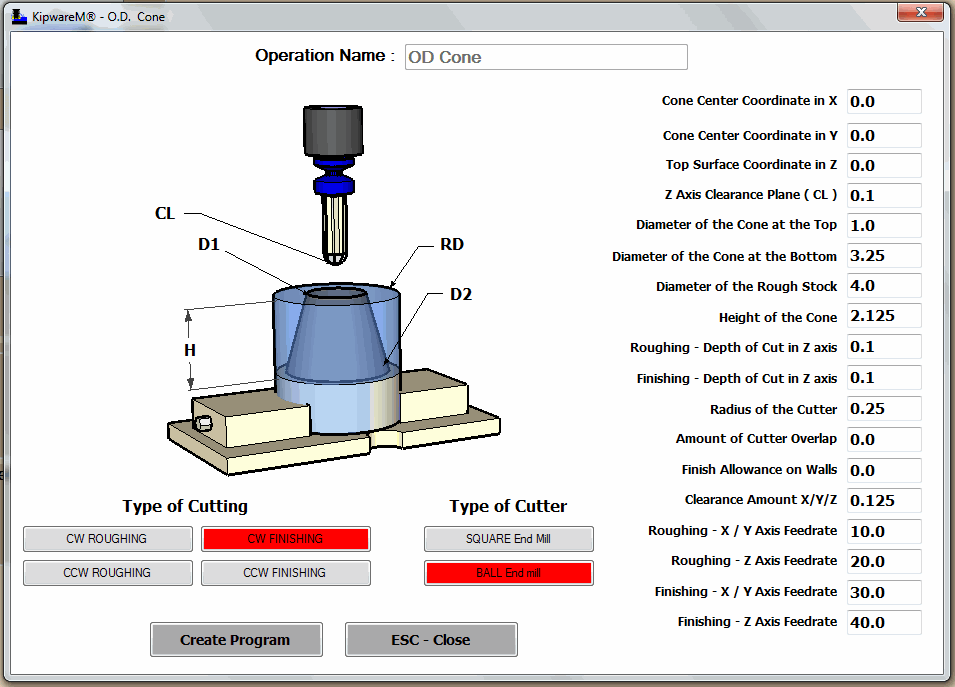
Kentech Inc. is pleased to announce the release of our ground-breaking 3D conversational option for our KipwareM® - Conversational CNC Programming Software for Milling.

This innovative and ground breaking release allows user to create G code programs for common 3D shapes using only a conversational, fill-in-the-blank forms. Release1 shapes include :

  • Tapered Cone
  • Tapered Hole
  • Tapered Square / Rectangle Boss
  • Tapered Square / Rectangle Pocket
  • Horizontal Trough
  • Vertical Trough
Powerful and innovative options are available to the user through the simple, fill-in-the-blank forms including :
  • Both Rough and / or Finish operations can be created.
  • Options for SQUARE or BALL NOSE end mills are included ... users can rough or finish these shapes using either a square or ball nose end mill !!
  • Climb or Conventional mill options are available for both roughing and finishing !!
  • Only basic, simple user inputs are required with KipwareM® performing all the complex calculations and creating the G code program all automatically.


Through this ground breaking and innovative development ... users now have the capability to expand their product and machining offerings without having to deal with expensive and complex CAD/CAM systems. Tapered holes ... or tapered square pockets can now easily be created using the simple KipwareM® interface.


Watch the video above and explore this new and groundbreaking
feature of KipwareM®

Since the late 1990's ... KipwareM® and Kipware® conversational have set the standard in conversational CNC programming software ... taking these applications from the limited, underdeveloped world of "wizards" into the mainstream of CNC programming. Kipware® conversational continues to set the standard and raise the bar with this 3D option release ... on the heels of our release of our patent-pending Machinst Mode for the Kipware® SketchPad.

For additional information on all our Kipware® CNC and machine shop software ... please visit our website at www.KentechInc.com.

Now more than ever ... 
Dump the G Code Wizards ...
GO PRO with Kipware® Conversational !!


Kenney Skonieczny - President
Kentech Inc.

Thursday, September 5, 2013

Reason #1 - TOP 10 Reasons - WHY KIPWARE®? - CAD/CAM OVERKILL !!!

#1 In our Series of the TOP 10 Reasons ... WHY KIPWARE® is :
CAD/CAM OVERKILL !!

Well we have reached the pinnacle ... the top of the mountain ... the essence of Kipware® !! During our series we have outlined a lot of good and valid reasons WHY KIPWARE® saves you money ... and here we are at #1 ... a little thing we call CAD/CAM OVERKILL. 


The main point behind CAD/CAM Overkill is : If you use your CAD/CAM system for EVERY CNC program you create ... you are impacting your productivity and efficiency in a very negative way.

Not every CNC program requires a CAD/CAM system or operator ... and requiring one brings all kinds of inefficiencies and removes all kinds of good chipmakers from your programming process.For the most part we are talking about professional job shops ... not the hobby machinist who has time to "play" ... although even some of the good hobby guys realize that a simpler and more efficient way to create simpler G code programs is a great idea. For the professional job shop ... getting the part running and getting good parts out the door is the key factor for their bottom line ... and requiring every job move through the CAD/CAM "guy" is not the best choice for 95% of the work they produce and a day-to-day basis. Most shops are not programming for molds or aircraft parts which the CAD/CAM system was designed. Yes ... for that type of work the CAD/CAM system is a must ... but for the flanges, shafts, simple milling, drilling, simple turning, grooving, threading ... CAD/CAM is OVERKILL !!


Kipware® CONVERSATIONAL software is the cure for CAD/CAM OVERKILL
As we mentioned many times in our Blogs ... we lived and worked on the shop floor. We cut our teeth ... cutting chips. The software titles we have created were born from our wants and needs from our experiences on the shop floor and in cutting chips. Kipware® conversational is a tool for your programming arsenal that can quickly and easily create those simpler, everyday G code programs ... the programs required in 95% of job shops around the world every day. We have Blogged extensively on this subject ... and invite you to look back using any of the links below :
But the bottom line is ... and the reason we selected CAD/CAM OVERKILL as our #1 Reason - WHY KIPWARE®? ... is that producing and delivering parts is the lifeblood of every machine shop. Don't deliver ... Don't get paid ... Don't survive and prosper. Today's shops need an arsenal of programming tools ... not a one size fits all CAD/CAM philosophy ... to be efficient. Adding Kipware® conversational to your programming arsenal will insure another layer of productivity and efficiency to your shop floor.

Kenneth Skonieczny - President
Kentech Inc.

And don't be fooled by simple, underdeveloped G code "wizards" ... 
If you're gonna go ... GO PRO ... with Kipware® Conversational


Tuesday, August 27, 2013

Reason #3 - TOP 10 Reasons - WHY KIPWARE®? - Control Incompatibility

#3 In our Series of the TOP 10 Reasons ... WHY KIPWARE® is :
Control Incompatibility

Almost every shop floor I have ever encountered consisted of different machine tools ... both from different machine tool builders and machine tools equipped with different CNC controls. And inevitably ... the control incompatibility issue would rear it's ugly head ... usually at the most inopportune moments. The most common issue came when the G code program was written for one machine ... now when it's time to run the part that machine is busy ... the program needs to be run in another machine which has a different control.

But there were also other scenarios ... like :
  • We want to buy another machine ... but the machine that would really fit nice is equipped with a different type of control ... what we will we do with all our older programs?
  • Jack only knows programming on machine A ... Joe is out today and we really need a program for machine B, the machine he programs.
  • ... and we can go on and on.
You get the point ... or are experiencing the point on your own shop floor.


Because we lived and worked in the real world ... we are able to "see" these types of issues ... and to create real world solutions to address them. Since 1986 ... when we were first contracted by Raytheon to develop G code conversion software for their shop floor ... Kentech Inc. has been a leader and a pioneer in G code conversion software. Over the years we have developed many customized applications to address many types of control incompatibilities on shop floors for various clients ... and then put that knowledge to use to develop our own line of G code conversion applications.

KipwareXC® is our user-defined or soft coded conversion application. Through a mixture of pre-defined conversion options and user defined conversion options ... KipwareXC® has been proven in-the-trenches to be both flexible and effective in converting G code from one format to another. With the ability to create multiple conversion Profiles ... users can configure KipwareXC® to handle multiple format conversions for multiple types of CNC's.

Kipware® CNC XChange is our hard coded applications. We design and build specific versions of CNC XChange to handle specific types of conversions. Rather than the user configuring the conversion options ... our developers write the conversions directly into the source code. To convert programs the user simply browses for the file to convert and selects convert ... CNC XChange prforms all the necessary conversions ... all automatically. Our most popular version of Kipware® CNC XChange is our Fanuc <--> Okuma version ... which is why it is our Reason #6 - TOP 10 Reason - WHY KIPWARE®?

Control Incompatibility and all the issues it creates on the shop floor ... is a major reason for production inefficiencies that will directly effect your companies bottom line. Removing that control incompatibility ... through Kipware® conversion software ...  is just one of the TOP 10 Reasons why KIPWARE SAVES YOU MONEY !!

Kenney Skonieczny - President
Kentech Inc.

Thursday, August 15, 2013

Reason #6 - TOP 10 Reasons - WHY KIPWARE®? - Fanuc / Okuma Compatibility

#6 In our Series of the TOP 10 Reasons ... WHY KIPWARE® is :
Fanuc - Okuma Compatibility
( We should also add the popular HAAS to this as well )

Reason #6 in our series TOP 10 Reasons - WHY KIPWARE®? deals with the two most common programming formats found in professional metalworking shops around the world. Tons of machine tool builders use Fanuc controls ... so much so that being "fanuc compatible" is almost a must for CNC controls. Willing to stand on their own merit ... Okuma have built a strong empire of their own using their own controls and their own programming format. Together ... "fanuc compatible" and Okuma controls make up a huge part of the installed CNC machine tool base. Even HAAS machine tools ... next on the list of most popular machine tools and who have their own CNC controls ... are 100% "fanuc compatible".


Having lived in the real world ... we have seen this first hand as we visited and worked in shops around the country. It's for this reason that all Kipware® titles support primarily Fanuc and Okuma ( and Haas ) controls.

Kipware® Conversational
All of our Kipware® conversational software creates G code that is Fanuc and Okuma compatible ... out of the box. No post processor nor any other conversion app's are required to create G code programs within Kipware® to operate your Fanuc, Okuma or Haas machine ... milling, turning or wire EDM.

Kipware® CNC XChange
Knowing that shops want to buy the best machine tool for their individual requirements ... tons of shops have a mix of Fanuc and "fanuc compatible" and Okuma machine tools on their floor. We created our innovative and ground breaking Kipware® CNC XChange software to address this particular issue ... what we call control incompatibility. Kipware® CNC XChange allows for the conversion of G code between Fanuc and Okuma formats. CNC XChange works strictly with the G code programs ... no CAD or CAM files are required ... and will auto-convert code from Fanuc format to Okuma format ... and reverse. CNC XChange and our other conversion app ... KipwareXC®  ... give shops who have a mix of CNC controls the capability to be more productive, efficient and to operate all their machines seamlessly by removing the control incompatibility from their shop floors.

KipwareEDU® Training Software
All of our KipwareEDU® training software deal primarily with Fanuc and Okuma CNC controls and their programming language / format. If you know Fanuc and Okuma G code programming ... that means you are qualified to program in about 95% of machine shops around the world.

Just a note for hobby machinists out there ...
Hobby machinists might find all this Fanuc and Okuma talk a little hard to believe ... living in their restricted MACH3 and other hobby CNC world. But the fact is that those who have chosen "fanuc compatible" professional controls have realized a major difference in functionality and power over the limited hobby controls and software. But don't take our word for it ... take a look at the website of the creators of MACH3 as illustrated below ...


The image on the left is from the Newfangled Solutions main webpage ... the one on the right is from their Services webpage. They both clearly show Fanuc controls ... not controls using their own MACH3 software. Even they have discovered what most professional machine shops know ... Fanuc controls and "fanuc compatibility" are the mainstay of professional machine tool builders. Kipware® conversational is MACH3 compatible ... but users have to program to the capability of the control ... so users miss a lot of the power and features of Kipware® as they have to create G code that this simpler control can run.

So if your shop floor is like the 95% of shop floors around the world and contain Fanuc ... Okuma ... Haas ... or "fanuc compatible" CNC controls ... Kipware® speaks your language.

Kenney Skonieczny - President
Kentech Inc.


Wednesday, August 7, 2013

Reason #9 - TOP 10 Reasons WHY KIPWARE®? - Unmatched ROI

#9 In our Series of the TOP 10 Reasons ... WHY KIPWARE® is :
Unmatched Return on Investment ( ROI )


We have always taken pride in our software pricing structure ... RESPONSIBLE PRICING has been our motto.

Within the first 2-3 quotes ... you've paid for our business software by quoting jobs that will actually make money ... and getting the quotes out the door quickly and accurately.
The first or second time someone creates that simple CNC program quickly and easily using Kipware® conversational ... by-passing the time consuming and complex CAD/CAM system ... you've recouped your conversational software investment.
Take any of our software titles ... because they are priced responsibly ... you will easily recoup your investment quickly and our "no maintenance fee" policy will insure your ROI keeps coming job after job.

Here is Why !!
While the majority of software companies add "features" to their software ... which enables them to drive up their price ... our development strategy is based on the "real world". What some companies call "features" ... we call "fluff". Things that look nice ... sound nice ... add complexity to the software ... but in the reality of the real world, you pay for but will probably never use. Kipware® cuts through the "fluff" ... which also cuts through the complexity ... and insures that our software "features" are the things you're looking for in that product ... in the real world.

Another area where software companies gouge their customers ... yearly maintenance fees. If you are on a program that charges a yearly maintenance fee ... do you feel that the software enhancements meet the fee cost? The majority of people we talk with tell us NO !!! These software companies are simply adding more "fluff" ... to try and legitimize their maintenance fee. Our UPGRADE POLICY ... when we release a new feature, we send out an email. If you feel that it is something you like and want ... buy the UPGRADE which is usually in the $95 to $145 range. If you decide you don't want or need that feature ... when the next UPGRADE comes along ... or the next or the next ... and you like that feature and buy that UPGRADE ... you still get everything that has come down the road. Basically ... no maintenance fee ... you pick-and-choose when you want to UPGRADE.

We recently released our SUBSCRIPTION PURCHASE option. For a minimum yearly fee ... you get everything !! For $125 a year ... you can purchase our most popular titles and get ALL UPDATES and UPGRADES FREE for the life of the Subscription. For $225 a year ... you can get the same for our multiple title bundles. This takes the worry out of installations ... file back-up ... updates and upgrades ... for a fee that is more than responsible. This also give users the ability to really try-before-you-buy ... use the full title with full features for a whole year to see if it fits what you need. If so ... just continue without interruption or loss of data.

Whatever way you slice it ... our Kipware® software pricing policy of RESPONSIBLE PRICING will insure a fast ROI and will insure that ROI keeps coming long after the initial costs are repaid.

Kenney Skonieczny - President
Kentech Inc.


Monday, August 5, 2013

Top 10 Reasons WHY KIPWARE? - Reason #10 - Real World

#10 In our Series of the TOP 10 Reasons ... WHY KIPWARE® is :
Kipware® Is Created By The Real World


If you follow this blog ... you'll know my name is Kenney Skonieczny and I am the President and principal buck-stopper at Kentech Inc.. Along with being the go-to guy ... all software design and development goes through me or is done by me. In this blog post that begins my outline of the TOP 10 REASONS ... WHY KIPWARE®? ( the software products we developed ) ... I would like to present a little background of HOW Kipware came to be and WHY we feel the Kipware® titles are top machine shop software applications.

I believe that an understanding of the design and development background of our software will clearly demonstrate why we call Kipware® ... Real World Machine Shop Software.

My life in the machine shop and in machine shop software development started on the shop floor. Infancy was as a Class "A" machinist learning and expanding real chipmaking knowledge and experiences operating everything from standard lathes and Bridgeports to manual vertical and horizontal millers ... planers ... OD / ID grinders ... cylindrical grinders ... gear hobbers ... open side planers .... manual boring mills ... and so much more. In addition ... the lost art of way scraping was learnt and perfected along with machine design and repair. Along the way I combined that with some machine design and engineering training as well.

Next phase was as an Applications and Service Engineer for a major Japanese machine tool builder ... where the knowledge of CNC equipment ... both repair and operation ... was learnt and expanded. That knowledge came in the form of machine installation and repair ... turn key set-ups ... programming training ... applications ... and much more. Living and touching the latest and greatest CNC equipment gave me an unmatched knowledge of CNC equipment ... and gave me an unmatched opportunity to learn CNC and combine my real world chip making experience as a machinist with CNC.

Moving on in life included stints in CNC programming and shop floor management as well as a Manufacturing Engineer in a high volume, high production environment. These enhanced real world experiences also exposed the real world gaps in available software applications ... and sparked the ideas for solutions to address and fill those gaps.

Expensive MRP and ERP software and pretty-picture, 3D CAD/CAM applications certainly have their place ... but my shop floor experience also showed that complex and expensive applications are not always the correct solutions. the Kipware® titles were developed to directly address the real world problems I encountered every day on the real world shop floor.

An example ... sure CAD/CAM is a great tool .... but for the 95% of programming we did on the shop floor CAD/CAM was overkill ... and too complex. This complexity eliminated good chipmakers ... who could be good, simple job CNC programmers ... from the programming process. Having to go to the "CAD/CAM guy" led to tons of inefficiencies ... and bottlenecks. Kipware® conversational is designed to give those good chipmakers the tools to help them create those simpler, everyday CNC programs ... the program created on 95% of real world shop floors everyday ... without having to rely on the expensive and backed-up "CAD/CAM guy". Kipware® conversational is not a simple, underdeveloped "G code wizard" designed for "hobby" machinists ... although it still has a place in that environment ... but a full blown, professional, shop floor programming application that includes conversational programming, conversational CAD/CAM, toolpath plotting, professional G code editors and shop floor tools and formulas machinists are always looking for.

This little "rant" about Kipware® conversational is a microcosm of our development strategy. Real World tools to solve Real World issues.

So that is our Reason #10 for WHY KIPWARE®? .... because we saw the real world problems and developed the real world solutions.

We invite you to explore all our Real World software titles at www.KentechInc.com ... and follow along with this blog and explore the other TOP 10 REASONS ... WHY KIPWARE®?

Kenney Skonieczny - President
Kentech Inc.


Wednesday, July 17, 2013

Easiest CAM Ever - The Machinist Mode in the Kipware® SketchPad

If you are looking for the easiest, fastest, no-experience-required CAM application on the market ... the Kipware® SketchPad is for you.

Check it out in our latest 2 minute presentation video :


Don't be fooled by the underdeveloped and severely limited "wizards" ... 
GO PRO with Kipware® !!

Kenney Skonieczny - President
Kentech Inc.

Wednesday, July 10, 2013

New G Code Conversion Application -- Kipware® CNC XChange

Since 1986 ... when we developed our first G code conversion application for Raytheon ... Kentech Inc. has been the pioneer and a leader in G code text conversion software. In addition to our off-the-shelf versions ... we often develop custom G code conversion applications to meet client specific requirements.

Recently we were approached by  a client who was looking to develop a G code conversion application to handle the following requirements :

  • The client had a large quantity of existing turning programs that utilized the tool tip programming point as the center of the tool nose radius ( TNR ) ... no cutter compensation ( G41 / G42 ) was utilized.
  • A new machine was about to be delivered and the client wished to change over to standard programming practice in which the programming point would be the actual tool tip.
  • PROBLEM : How to auto-convert all those existing turning programs into a format compatible with the new machine ... to be used on the new machine ... and maintain consistency on the shop floor.
We set to work.

In an unheard of time frame of just 2.5 weeks ... we designed, developed and BETA released a new version of our Kipware® CNC XChange software that met the clients requirements. Here's how it works :

  • The user simply BROWSES for the file to be converted ... and selects CONVERT
  • Kipware® CNC XChange then ... first ... gathers the tool information from the existing program and displays a list for the user.
  • Using the existing programs set-up sheet ... the user enters the original tool's nose radius and selects the tool nose cutting position from a graphic display. The user also has the ability to change to T code command to match the new tool's position in the turret.
  • Once all the tooling information is complete ... Kipware® CNC XChange then performs all the math ... auto-adjusts and replaces the X and Z coordinates ... and performs a variety of other G code conversions required to transform the older programs into a format compatible with the new machine.
  • The original G code program and the converted G code program are then displayed in a side-by-side editor for review and any additional editing the user might desire.
  • All automatically ... all within a time frame of less than 3 seconds !!!

Tool Configuration Screen ... the user selects from a list of available
graphic tool representations to "tell" CNC XChange where
the tool is cutting and what kind of tool it is.
Utilizing our G code conversion development skills and real world chip making background ... we are able to bring our clients existing G code programs from old, outdated G code to modern, standard G code with a minimum of time and effort. This version of Kipware® CNC XChange allows them to utilize their thousands of existing G code programs in their new machine ... saving hundreds if not thousands of of re-programming and editing hours.

Have a control incompatibility issue on your shop floor?

Why not put the G code conversion development skills of Kentech Inc. to work on a solution? We can help your shop realize seamless integration between all your machines resulting in increased efficiency and production.

You can check out all our off-the-shelf G code conversion applications here :
http://www.kentechinc.net/

Contact us toll free at 1.888.754.1198 or via email at Sales@KentechInc.com to discuss your G code conversion requirements.

Kenney Skonieczny - President
Kentech Inc.


Friday, May 31, 2013

Coming in June ...

We are pleased to announce that we will be releasing our newly revised and enhanced KipwarePA® - G Code Programming Assistant application in the middle of June.

Here are a couple of teaser screen shots :

KipwarePA®'s MILLING Mode

KipwarePA's TURNING Mode

Create G code with a simple POINT-AND-CLICK interface.

You can easily customize BUTTONS to output your specific required outputs !!

KipwarePA® was designed to give users an easy programming application in which they can create G code programs. Who can benefit from KipwarePA® ? Basically ... anyone who CREATES ... EDITS ... or works with G code ...here is why :

  • By eliminating typing errors, misplaced codes, missed codes and mis-formatted codes it assists the user to create a error free and efficient programs.
  • KipwarePA® uses a simple point and click interface. By clicking the buttons on the screen the user can add movement...G code...M code...just about anything to the program being created.
  • If more than the click is needed, KipwarePA® will auto-display a fill-in-the-blank form and will auto-convert the entered form data into the correctly formatted corresponding G code output and add to the program editor.
  • As code is being created it is displayed on the screen ... this is a great way to learn G code programming !!
  • Once the program creation is completed ... the code in the window is auto-converted and displayed in our full featured. G code Editor. The Editor is fully G code specific with tons of features like auto-sequencing and re-sequencing, add / remove spaces for readability, and much more. In addition, the Editor can be used from scratch to create or edit ANY G code program ... whether created in KipwarePA® or not.
  • Our KipwareTP® Toolpath Plotting software is also included ... plot programs created in KipwarePA® or ANY G code program.

So .... the complete lowdown :

  • KipwarePA® also is included standard with all Kipware® conversational, full version purchases ... the best of both worlds !!
  • KipwarePA® is also available as a stand-alone application and includes :
  • KipwareTP® - Toolpath Plotter and Editor
  • KipwareDNC® - Serial Communication Software

As always ... UPGRADES for Kipware® conversational software are FREE and INCLUDED for (3) months ... so making a purchase of ANY Kipware® conversational application now will insure you get a FREE UPGRADE to the new KipwarePA® when released in June !!!

So don't wait ... DUMP the WIZARDS !!! ... GO PRO with Kipware® Conversational !!

Kenney Skonieczny
President - Kentech Inc.

Tuesday, May 28, 2013

New 4 Axis CNC XChange Option Slated For Release

We are pleased to announce the release for our Fanuc / Okuma OSP 4 axis conversion option for our Kipware® CNC XChange software.


This option will allow for the conversion of (2) Fanuc style programs ... turret #1 and turret #2 ... simultaneously into Okuma OSP code and then the two programs will be auto-merged into one program when completed. In addition to the standard G code conversions that are currently performed by CNC XChange ... this option will auto-convert all Fanuc style "waiting codes" as well as spindle commands, gear change M functions, optional stop commands into Okuma OSP "P" code formats. In addition ... the user will have the ability to define up to (10) user specific commands to be converted into Okuma "P" code commands. Such machine specific commands such as gear range M functions and others can be customized easily by the user with this feature.


Once the conversion is completed, the Kipware® CNC XChange Editor will display each program ... original and converted ... in our unique 4 axis Editor. Each program can be viewed, compared and independently edited within the Editor. Selecting the MERGE CONVERTED FILES will cause the software to merge the files and complete the conversion process.

The initial release will include Fanuc to Okuma conversions ... we do anticipate a reverse conversion of Okuma to Fanuc in the very near future ... probably before the end of June.

For additional information on Kipware® CNC XChange ... CLICK HERE.

Kenney Skonieczny - President
Kentech Inc.

Wednesday, May 15, 2013

Kipware® Conversational vs. G Code Wizards

Since the late 90's ... we have worked hard to take our conversational CNC programming software out of the world of "wizards", after-thoughts and add-ons ... and into the world of professional, power packed CAM applications.

We would like to thank the over 1200+ users of Kipware® conversational for proving that our efforts have been successful.

Why? What makes us the professional conversational application that we are?
Here are just a few reasons :

KipwareM® - MILLING :

Here is a sample screenshot of a KipwareM® operation ... in this case a SQUARE / RECTANGULAR POCKET. Just take a look at the machining options available for the user to select :

  1. SQUARE or RECTANGULAR ... long side in X or long side in Y ... the software automatically "sees" it.
  2. CORNER RADIUS ... milled using circular interpolation or plunge ...  the software automatically "sees" it.
  3. X / Y RAMP AMOUNT ... you decide how much ... not an arbitrary angle, a real distance.
  4. FINISH ALLOWANCE ... for walls and bottom.
  5. ROTATION ... pocket at a 5 degree angle ... just input 5 ... the software writes the rotated G code automatically ... and not some G code for rotation ... hard numbers.
  6. ROUGHING and / or FINISHING ... CW or CCW ... climb or conventional ... you decide.
  7. CUTTER COMP ... automatically inserted if you desire ... with auto ramp in / ramp out.
  8. FINISH BOTTOM ... or just the walls ... you decide.
KipwareT® - TURNING :

Here is a sample screenshot of a KipwareT® operation ... in this case an OD GROOVE. Just take a look at the machining options available for the user to select :

  1. DEPTH OF CUT IN Z ... plunge rough ... you determine the Z axis DOC.
  2. CORNER CHAMFER / RADIUS ... just input the value ... and not just 45 degree chamfers ... any angle you want.
  3. CUT-OFF CYCLE ... not just grooving ... cut-off with pecking and even complete retraction.
  4. GROOVING ... tons of options for straight cutting, pecking with just a retract or complete retraction.
These are just a couple of the conversational, fill-in-the-blank menus which our users can use to create complex cutting operations.


Not to mention all the companion apps that come with Kipware® conversational :

  1. Kipware® SketchPad - Conversational CAD/CAM ... easiest CAM ever !!
  2. KipwareTP® - toolpath plotting app now with a full user defined tool library for graphic simulation.
  3. KipwareTB® - machine shop toolbox software
  4. KipwarePA® - point and shoot G code creator for milling and turning.

There are NO OTHER programming app ... "wizard" or hide behind the "conversational wizard" ... that can match the power and features of Kipware® conversational. We invite you to look around ... we are sure that like the 1200+ Kipware® users ... you'll realize that only Kipware® conversational gives you the professional features you need to be successful.


Kenney Skonieczny - President
Kentech Inc.

Friday, April 26, 2013

Easiest CAM Ever? ... You Decide.

The Kipware® SketchPad with the new patent-pending Machinist Mode might just be the easiest CAM program ever.

The Machinist Mode allows the user .. the machinist ... the freedom to take control of the cutter and to create any toolpath desired. The SketchPad frees you from the rigid CAD/CAM world and all the restrictions and inefficiencies that come along with it.

Take a look at our demo video illustrating a pocketing with island example ... then you decide.


The Kipware® SketchPad with the new Machinist Mode is available STANDARD in all Kipware® conversational titles ... or as a stand alone package which includes features for programming milling, turning, wire EDM, waterjet and plasma CNC machines.

Check it our in more detail here :
http://www.kentechinc.com/KipwareSketchPad.shtml

Kenney Skonieczny - President
Kentech Inc.

Thursday, April 18, 2013

Innovative CAM Features Released for Kipware® SketchPad

We have always been driven ... for over 27+ years ... by our real world experiences in real world machine shops ... operating real world machinery ... cutting real chips ... to develop and design machine shop software that addresses the real world issues we faced every day during those years.

Those solutions do not necessarily have to create the prettiest pictures ... have the most menus ... cost the most money ... simply, they just have to work efficiently and effectively. We take pride that shops ... around the world ... every day ... profit from our products and our solutions.

And today we are introducing another one !!

Our Kipware® conversational CNC programming software is setting the standard and raising the bar for conversational, easy-to-use, CNC programming software. Applications that tackle the everyday CNC programming performed in 95% of shops around the world every day ... without mixing in the complexity of expensive CAD/CAM software. For workpieces that don't fall into the everyday, standard category ... the Kipware® SketchPad has always been available as a simplified CAD/CAM module to handle those situations.

Now .... following in the inspirational words of Chef Emerald Legasse :  BAM !!!!!
We have taken the easy-to-use and innovative Kipware® SketchPad ... and kicked it up a notch !!

How? What? Why?

We have added a new, patent-pending feature called the Kipware® SketchPad Machinist Mode ... a fast and easy approach for creating user defined roughing programs for turning, milling, wire EDM, waterjet and plasma cutting. Combined with the already proven-in-the-trenches finishing features of the SketchPad, the Machinist Mode roughing module provides a new level of CAM programming suitable for everyone ... from novice or expert.

Basically ... the Kipware® SketchPad Machinist Mode allows the user to move a graphical representation of a user define cutting tool ... in rapid or feed mode ... around a graphical representation of the workpiece ( SketchPad drawing or DXF import ) ... and the SketchPad auto-converts those recorded movements and mode into a G code program.

It would probably be a long read if we try to put it into words ... 
so we invite you to visit the Kipware® SketchPad webpage ... http://www.kentechinc.com/KipwareSketchPad.shtml ... 
and read the details and watch the video presentations. 

The Kipware® SketchPad Machinist Mode now adds the capability in Kipware® conversational to quickly and easily create G code programs for :
  • Roughing and finishing of pockets with islands ... of any shape or size !!
  • Roughing and finishing of complex milling contours !!
  • Roughing and finishing of any type of turning contours without the use of canned cycles !! ( now Kipware® conversational is even more compatible for hobby CNC with MACH controllers )
Now the complete Kipware® Conversational Packages ... KipwareM ( milling ) ... KipwareT ( turning ) or KipwareW ( wire EDM, waterjet, plasma) include :
  • Conversational module for standard shapes
  • Kipware® SketchPad with the new Machinist Mode for non-standard shapes
  • KipwareTP® - G Code Editor and Toolpath Plotting software.
  • KipwareTB® - Machinist Toolbox Software
  • KipwareDNC® - Serial Communication software
  • KipwarePA® - Point and Click Programming Assistant
The Kipware® SketchPad with the new Machinist Mode is available as stand alone application as well.

Once you see the power and features of the new Kipware® SketchPad Machinist Mode ... you will know why we say :

Kipware® Conversational ... Don't Call Me a Wizard !!


Kenney Skonieczny - President
Kentech Inc.

Thursday, April 11, 2013

R U Using the Wrong Tool for the Job?


Do any of these feel familiar when you are doing your CNC programming?

Most production shops run to the "CAD/CAM guy" when they are in need of CNC programming. And if the programming is complex ... mold and die programming, 5 axis programming ... that is the best path to take.

But the reality is ... for the 95% of CNC programming done in real world shops everyday .. that's not the best path to take. For this type of programming ... CAD/CAM is Overkill ... and can slow down productivity and rob the shop floor of efficiency. Given the right tool ... most chipmakers can create the 95% of everyday CNC programs without the need for a complex CAD/CAM system. It's a no brainer that allowing more people to create the simpler, everyday programs will lead to faster programming and improved productivity. Leave the "CAD/CAM guy" for the tough "stuff" ... and let others do the simpler "stuff".

What is the right tool? 

Since the early 1990's, Kipware® conversational CNC programming software has been helping chipmakers create fast, efficient CNC programs for the 95% of programming done in the real world everyday. With our latest innovations, enhancements and features ... we are adding more and more power to Kipware®. While using our unique blend of chipmaking, CNC and programming skills to keep the complexity level low and the productivity level high. Kipware® allows novice or expert to quickly and easily create efficient G code programs.


Want to remove this from your shop wall?

We invite you to take a look at the new, improved and enhanced Kipware® Conversational CNC Programming Software for Milling ( KipwareM® ) --- Turning ( KipwareT® ) --- Wire EDM / Waterjet / Plasma ( KipwareW® ). See what using the right tool can mean for your shop floor and your productivity.


Kenney Skonieczny - President
Kentech Inc.